

The biggest risk with AI in research isn’t that it writes badly.
It’s that it writes confidently wrong.
Last month, I gave 3 conference talks on AI in research.
And the same fear came up every time.
“How do I make sure the AI doesn’t hallucinate and my output is correct?”
That fear is valid.
Because in academia, a single slip-up. One wrong fact. One invented citation. One misquoted number.
Doesn’t just “look bad.”
It can undermine research integrity.
And it can follow you.
Here’s what makes hallucinations so dangerous.
They’re usually small.
Plausible. Confident.
The kind that sneaks into a draft at 11:47 pm when you’re tired and just want to be done.
And as models get better, they get harder to catch.
I call this the “sleeping at the wheel” problem.
It gets worse as self-driving improves.
To be completely honest.
We may never get hallucinations to absolute zero.
But you can cut them down to “rare enough” that AI becomes safe and useful for real research work.
Here are 7 strategies I use to reduce AI hallucinations to near zero:
1) Use thinking models when stakes are high
If it’s going into a manuscript, grant, IRB doc, response to reviewers, or anything with your name on it.
Don’t use the fast model.
The fast model is like your first bencher.
Too eager to answer.
Raises their hand to every question.
And is often wrong.
On the mechanistic side of things, it is giving the most probabilistic answer that it can find. But as researchers, we know that just because something has a high probability, doesn’t make it correct.
“Thinking” models often do better because they don’t just blurt out the first answer. They try multiple paths, pick the best one, backtrack if needed, and double-check / correct mistakes. This strategy cuts down on the “one-shot” errors fast models make.
Yes, it can also overthink, waste time, or get stuck following a bad line of thought, but the errors are typically far less.
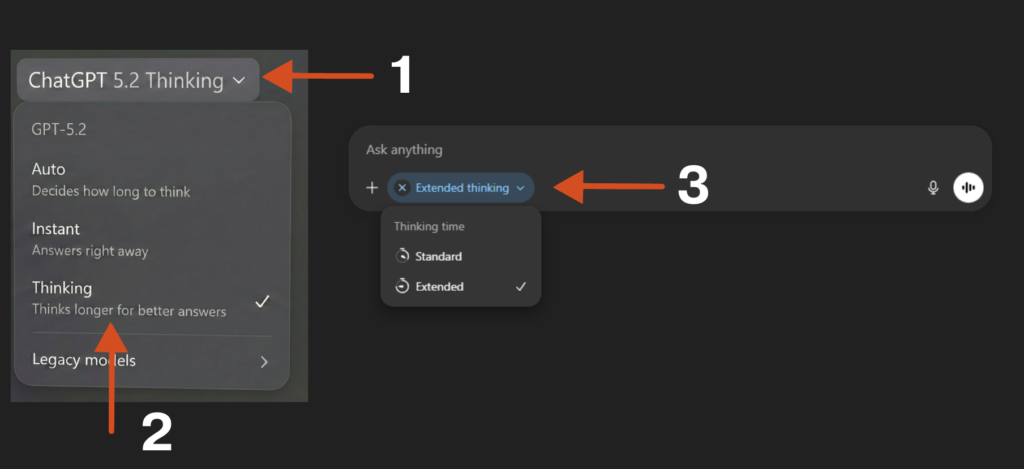
Click on ChatGPT on the top left → Choose “Thinking” → Then on the Chat panel, click on Thinking, to choose “Extended”.
For all things where mistakes can be costly, I would choose the thinking model (ideally “extended thinking”).
Speed is cheap. Credibility isn’t.
2) Ground it with the exact source material
Most hallucinations happen when the model is forced to “guess” what you meant.
So don’t make it guess.
- Paste the exact table / figure / results output
- Upload the PDF or protocol if you need accurate extraction
- Double-check to make sure no information that you refer to is missing. e.g., You reference Table 1 or Figure 1, but do not attach any Table 1 or Figure 1.
Try providing just two lines of results and asking it to write an abstract.
It will likely hallucinate.
But if you provide the full study details, the risk drops dramatically.
Less guessing.
More copying from reality.
3) Turn on search
Search is the antidote to hallucination.
AI models are trained on a snapshot of the internet.
Billions of words compressed into patterns.
When asked a question, they don’t actually “know” the answer. They complete the pattern based on what sounds most probable.
The sky is […]. “Blue” has the highest probability, so blue.
Not lying. Just pattern-completion.
Search breaks that loop.
It forces the model to reach outside its frozen training data and cite something real. Something it has to cite rather than generate.
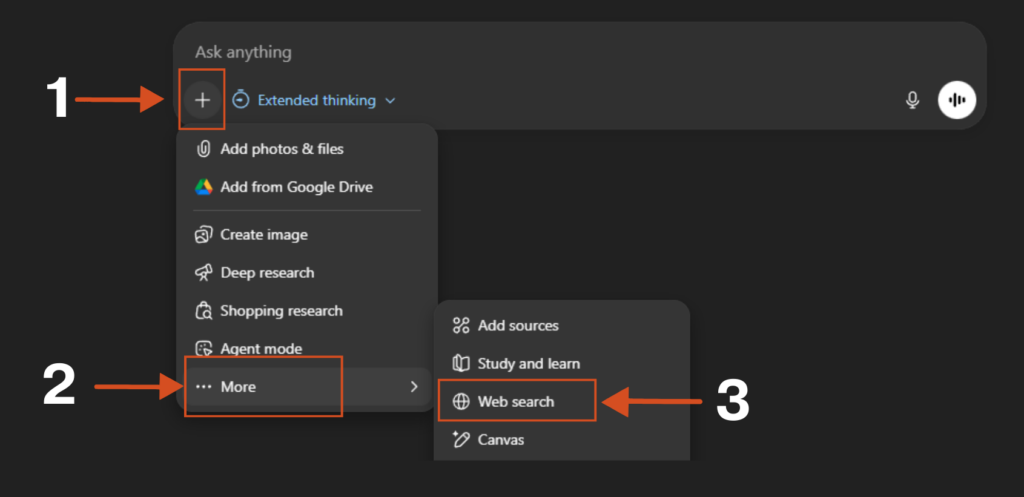
Click on “+” → More → Choose Web Search
Pre-training gave AI a memory. Search gives it eyes.
And a model with eyes hallucinates far less than one running blind on memory alone.
While building Research Boost AI academic writer, we used these same principles to mitigate hallucinations (which was non-negotiable and part of the reason it took so long).
We front loaded questions for the researcher to put in as much information as they could about a particular manuscript section. Then added search upfront so that whatever the writer would produce would be based on the researcher’s input and search (not from AI’s training data). That was the core principle of how we tackled hallucinations in Research Boost.
4) Work inside a Project so context compounds
Grounding and search help. Projects take it one step further.
Projects are dedicated workspaces (ChatGPT, Claude, and Grok have them).
You set them up once. AI remembers the context across conversations.
Inside a Project, you can:
- Write custom instructions that apply to every chat
- Upload files the AI can reference any time
- Build a “trusted context” that compounds over time
What I do in ChatGPT Projects:
(Refer to “Project-Level Personalization” on my AI guide HERE on how to set up a project.)
Instructions: Define the goal, what “good output” looks like, and your style and tone.
Files: Don’t upload a junk drawer of docs. Create one clean Google Doc with only the best source material, export it, and upload that.
Chat: Start a new chat inside the Project. Use extended thinking. I often prompt: “Only use my files as a source.”
When the model has stable context, it guesses less. When it guesses less, it hallucinates less.
5) Reduce scope (stop asking for magic)
The more jobs you give AI at once, the more likely it is to hallucinate.
The riskiest prompt is the one we all secretly want:
“Write my introduction from scratch and include citations.”
That’s where fake references are born.
Instead:
- Do the search separately
- Pull the key snippets you trust
- Then ask AI to write only from that supplied context
Less magic. More control.
6) Force a verification pass (make it show its work)
Don’t ask for the final draft first.
Ask for the fact-check first.
Here’s the exact prompt:
Before writing the final response, act as a research fact-checker:

1) List every factual claim you plan to make (numbers, dates, definitions, citations).
2) For each claim, provide:
   - Evidence: the exact quote from the text I provided
   - Location: page/section/table/line reference
3) If a claim is not supported, write: NOT FOUND (do not guess).
4) Then write the final response using only VERIFIED claims.
This catches “sounds right” errors before they contaminate your draft.
We built in this verification loop at each step of manuscript writing process in Research Boost, which is how we were able to make it more credible. On the flip side, it does make it slightly slower but that’s a trade-off I’d accept everytime.
7) Give it permission to say “I don’t know”
Most hallucinations happen because the model feels pressured to answer.
So remove the pressure.
Literally tell it:
- “If unclear, say: ‘I don’t know from this data.’”
- “If you are unsure, ask me further questions. Do not make things up.”
That one sentence changes everything.
Because now it’s allowed to pause…
instead of invent.
BONUS: Just repeat the instructions
This sounds silly, but it actually works.
We’ve all been there → the AI just doesn’t seem to understand what we want, no matter how clearly we explain it.
But here’s a surprisingly simple fix:
Just repeat your main instruction twice in your prompt.
Think of it like emphasizing something important in a conversation by saying it again.
I usually put the key instructions at both the beginning and end of my prompt. Since AI learns from how humans write, and we naturally pay more attention to the start and end of things, this approach tends to work well.
Tests across different AI models (Gemini, GPT-4o, Claude, and DeepSeek) showed this simple trick worked better in 47 out of 70 tests. Some tasks saw accuracy improve by as much as 76%.
The best part: This doesn’t make the AI slower or make responses longer, so it’s a completely free upgrade.
When in doubt, say it twice.
You don’t need perfect AI. You need a safer workflow.
Don’t aim for “AI that never hallucinates.”
Aim for a workflow where hallucinations can’t survive.
You’re not outsourcing your judgment. You’re building guardrails.
You’re turning AI into what it should be in research:
A fast assistant.
Not an author.
Not a statistician.
Not a source of truth.
Once you build this muscle, something changes.
You stop being afraid of AI.
You stop avoiding it.
You start using it where it shines → drafting, structuring, summarizing, clarifying (while keeping your work’s integrity intact).
That’s the whole game.
Not trusting the model.
Trusting your process.
When you do it right, AI doesn’t replace you.
It amplifies you.
Your thinking.
Your speed.
Your output.
Your impact.
PROMPT OF THE WEEK
Reverse Brief Prompt for Research Projects & Grants
Use this to gain clarity on what needs to happen to for example successfully complete Aim 1 of your grant.
You are my research design & grant-strategy co-pilot.

I want to accomplish [state the outcome you think you want] in a research project/grant.

Important: Do not give me strategies, steps, frameworks, or advice yet.
Before proposing any solution, your only task is to deeply understand the research problem and the funding context.

Your task

Ask me exactly 5 high-quality clarifying questions that uncover, with reviewer-level specificity:

Scientific scope & gap
– what is known vs unknown, why this matters now, and what decision/clinical/scientific uncertainty this resolves

Study design constraints & feasibility
– limits around cohort access, outcome availability, follow-up time, recruitment/retention, IRB/privacy, and operational bottlenecks

Data/resources & environment
– datasets/registries/EHR/biobank access, collaborators, methods expertise (biostats/ML/omics), institutional cores, letters of support, and budget realities

Timeline, milestones, and deliverables
– key deadlines (submission, start date), what must be completed in Year 1 vs later, and whether the priority is speed, rigor, novelty, or generalizability

Success criteria & “real objective”
– what “done” looks like (aim-level outputs), primary endpoints/metrics (e.g., effect estimate precision, prediction performance, implementation readiness), and whether the stated goal is a proxy (e.g., de-risking an R01, generating preliminary data, career development, clinical adoption, or stakeholder buy-in)

Rules

Ask the questions one at a time, in a logical order.

Make each question specific, non-generic, and decision-shaping (something that meaningfully changes aims/design/analysis).

Challenge assumptions when something is vague, infeasible, or misaligned with the likely review criteria.

Do not propose solutions, tactics, examples, or draft text until all 5 answers are provided.

If I don’t know an answer, I may respond “UNKNOWN”—then ask for the minimum additional detail needed to proceed without guessing.
💬 Which part of your workflow is most vulnerable to hallucinations right now: results, citations, or interpretation.
P.S. I built Research Boost for the same reason.
It only pulls from high-impact, peer-reviewed sources and verifies every citation, so your facts, numbers, and statistics stay rooted in real, verifiable sources, not AI guesses.
Try it here FREE: https://researchboost.com/
And if you are a PhD student or postdoc looking to land an industry career → Check out the PhD Paths newsletter by Ashley Moses (Neurosciences PhD Candidate at Stanford University). Each week, you’ll get stories, strategy, and advice from PhDs who’ve successfully made the transition!
Learn more: https://phdpaths.substack.com/