

You opened Claude or ChatGPT this morning with the best of intentions.
You wanted help with a grant aim. Or a methods section. Or a response to a reviewer who clearly skimmed your paper. You typed something reasonable, hit enter, and got back generic prose that sounded like a third-year medical student padding a personal statement.
Most researchers blame the model when this happens. But the model did exactly what you asked it to do.
You asked it to guess.
This post is going to be a detailed (and long) guide as to how you can genuinely make AI work for you and act for the first time as your research assistant.
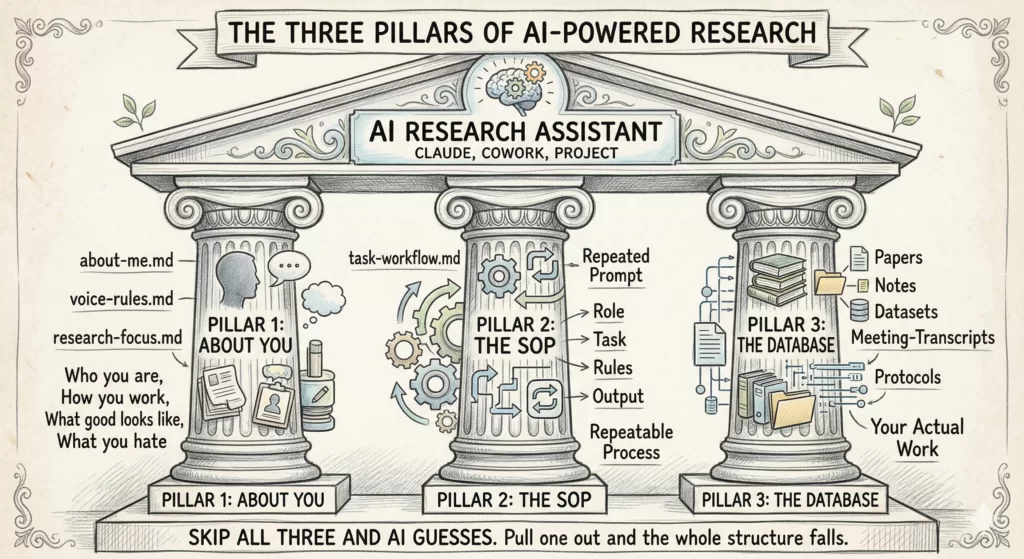
AI is only as useful as the 3 things you give it before you ask it to do anything. Think of it as 3 pillars holding up everything you do with AI. Pull any one of them out and the whole structure falls.
Pillar 1: About You. Who you are, how you work, what good output looks like to you, what you cannot stand.
Pillar 2: The SOP. The exact workflow for the task, written down, repeatable, saved as a prompt you can load anytime.
Pillar 3: The Database. Every paper, note, dataset summary, meeting transcript, and protocol that AI needs to ground itself in your actual work.
Most researchers skip all three and then blame the model. The model is the most over-eager research assistant on earth. It needs supervision the same way a brand-new fellow does.
[Note: This whole piece talks about Claude. That is intentional. The line between “Claude” and “AI” is collapsing for working researchers. Currently, Claude is AI and AI is Claude. You can run this same setup in Claude Cowork (the desktop app that reads and writes to a folder on your computer) or in a Claude Project (the web version with a knowledge base). Both work. Pick whichever fits how you already operate. The project workflow is also available in ChatGPT but co-work is specific to the Claude desktop app.]
In this post, I will walk you through the concept of the 3 pillars using the a manuscript writing example, because almost every researcher reading this has a half-finished one sitting in a folder somewhere. But the same 3 pillars carry over to grant writing, literature review, study design, IRB protocols, response to reviewers, statistical collaboration, mentor meeting prep, and the slow grind of revising a thesis chapter. Build it once. Reuse it everywhere.
PILLAR 1: About You
The first thing AI needs is a model of you.
Not your CV. Not your H-index. Not your title. AI needs the actual texture of how you think, what you sound like on the page, what you want output to feel like, and the things that make you close the laptop in frustration.
When you ask Claude to “write a paragraph in my voice,” it produces something competent and forgettable. It cannot read your mind. It needs three short files, saved once, loaded every time:
about-me.md: who you are, how you work, what you care aboutvoice-rules.md: words you use, words you ban, sentence patterns you preferresearch-focus.md: your field, your study populations, your methods, your usual collaborators
Each file should sit under 2,000 tokens. Tight. Specific. Built once.
A new postdoc takes 18 months of feedback loops to start writing with your frameworks. Claude can run 100 of those loops in 100 minutes. But only if it knows what you are aiming at.
The hard part is writing the first file honestly. Here is an interview prompt that walks you through it. Drop this verbatim into a fresh Claude conversation and let it interview you:
You are going to interview me to build my "about-me.md" file.

Use the AskUserQuestion tool to ask me 15 to 20 short, sharp
questions across these categories:

- WHO I AM (role, background, what I actually do day to day)
- HOW I WORK (rituals, time of day, tools, energy patterns)
- WHAT GOOD LOOKS LIKE (specific traits of output I'm proud of)
- WHAT YOU HATE (formats, words, tones, clichés that make me
  close the tab)
- YOUR RULES (non-negotiables in your work)
- YOUR OPINIONS (strong takes, hills you'll die on, contrarian
  beliefs)

Ask one category at a time. After all questions, compile my
answers into a single about-me.md file under 2,000 tokens,
structured as:

## Who I am
## How I work
## What good looks like
## What I hate
## My rules
## Instructions for Claude

Output the file in a single code block. Do not summarize.
Do not add commentary.
Run this once. Save the output. You now have a context block Claude can load on every future task.
The instructions need to be very clear. Replace every fuzzy adjective with an observable behavior. “No em dashes. No hedging phrases like ‘it could be argued.’ Lead with the finding, not the framing.” Now Claude has something it can actually act on.
Do the same for voice-rules.md and research-focus.md. List the rules as if you were briefing a new research coordinator on day one.
📝 Pro tip: Once these files exist, you do not need to rewrite them every month. Update them when something genuinely changes.
PILLAR 2: The SOP (Standard Operating Procedure)
The second thing AI needs is the workflow for the task you are doing right now.
Not “help me with the introduction.” That is a wish, not an instruction. An SOP is the step-by-step procedure you would hand a brand-new fellow on their first day, written down so you never have to explain it twice.
Every good research SOP has 4 parts.
1. Role. Who Claude is for this task.
“You are a clinical researcher experienced in writing introductions for peer-reviewed clinical and translational science manuscripts. You write in plain academic prose with a clear narrative arc and no padding.”
2. Task. The exact thing you want done. For an introduction, this is where you ask for the PGHS structure with the 3-2-1 History of Knowledge approach baked in.
“Produce a structured outline for the introduction of my manuscript on [TOPIC]. Organize it using the Problem, Gap, Hook, Solution framework. For the Problem section, use the 3-2-1 History of Knowledge approach. Start from the gap and work backwards through three layers of established knowledge that the target journal’s readers already accept. Knowledge 3 is the most established background fact. Knowledge 2 builds on it. Knowledge 1 sits closest to the gap and sets it up logically. Then state the gap in one sentence using a tension word like however, but, or yet. Then write the Hook as one to two sentences that answer why solving this gap matters now. Then write the Solution as a single sentence that states the objective of the study.”
3. Rules. The constraints that keep the output usable.
“Use short declarative sentences. No hedging language. Cite only papers from the references file I attached. Do not invent any DOIs or fabricate authors. Do not write full polished prose. Output as a bullet outline grouped by PGHS section. Flag any place where the references I gave you are insufficient and tell me what additional evidence I need to find. Match my voice rules in the attached voice file.”
4. Output. The shape of the answer so you can use it without reshaping it.
“Return a markdown outline with four section headers: Problem, Gap, Hook, Solution. Under Problem, use three sub-bullets labeled Knowledge 3, Knowledge 2, Knowledge 1. For each bullet across all sections, include the key idea in plain language followed by the citation in brackets. End with a one-paragraph Reviewer Stress Test that lists the three weakest links in the logic and what I should strengthen before drafting the prose.”
That last line is the validation step. Asking Claude to find the holes in its own outline is the cheapest insurance policy you have. You still own the final draft. Claude is giving you the scaffolding, the citation map, and a list of weak spots to address before you write a single sentence of prose.
The same SOP works whether your manuscript is about psoriatic arthritis, sepsis biomarkers, or telehealth adoption. Swap the topic. Swap the references file. The structure holds.
📝 Pro tip: Save that whole prompt as a file in your SOPs/ folder. Name it outline-introduction-v1.md. Next time you need an introduction outline for any paper, you load that file, swap the topic, and run it. You are not starting from a blank prompt. You are running a procedure.
The same iteration loop that takes a human collaborator three meetings and two weeks takes you three turns and four minutes. But only if the SOP is written down. Without it, every task starts from zero.
You should have an SOP for every recurring research task. Outlining a methods section. Drafting research meeting notes. Prepping for a mentor meeting. Drafting a Table 1 shell. Organizing notes from a conference.
Build one. Use it. Refine it after each use. Within a month you will have a personal library of SOPs that compounds in value every week.
Bonus Upgrade: Turn Your SOP Into a Claude Skill

Once your SOP works, you can level it up.
Claude now supports something called Agent Skills. A Skill is just a folder with one markdown file that Claude discovers automatically and loads when the task matches. Same idea as your SOP. The difference is that Claude finds it for you instead of you loading it manually.
To build your first skill → Open Claude. Type one sentence:
“Let’s create a skill together using the skill-creator skill. First, ask me what the skill should do.”
That is the entire trigger. The skill-creator takes over from there. It will interview you in the same step-by-step way the about-me prompt did, but tuned for building skills instead of building your context file. You answer in plain English. It writes the skill.
(Just reply to this post if you want me to write a post on how to write skills.)
PILLAR 3: The Database
The third thing AI needs is your stuff.
Not the internet’s stuff. Not what some random model trained on Reddit thinks about your research field.
Your stuff. Your papers, your protocols, your conference talks, your lecture notes, your meeting notes, your data dictionary, your reviewer comments from the rejected version, your old grant aims, your collaborator’s email about the cohort definition.
Without this, Claude is guessing.
Set up one folder. Inside it, build subfolders that match how you actually work:
research-database/
├── current-projects/
│   ├── psa-cv-outcomes/
│   │   ├── protocol.md
│   │   ├── analysis-plan.md
│   │   ├── meeting-notes-2026-03/
│   │   ├── draft-tables.xlsx
│   │   └── references.bib
│   └── axspa-biomarker-study/
├── grants/
│   ├── k23-submitted-2025/
│   ├── r01-in-prep/
│   └── pilot-applications/
├── lit-libraries/
│   ├── psa-cardiovascular/
│   ├── spondyloarthritis-imaging/
│   └── methods-papers/
├── teaching/
│   ├── lectures/
│   └── mentee-feedback/
└── reference-docs/
    ├── icmje-guidelines.pdf
    ├── strobe-checklist.md
    └── target-journal-instructions/
Point Claude Cowork at the root folder. Or upload the relevant subfolder to a Claude Project. Either way, when you ask Claude to outline your introduction, it has the actual protocol, the actual references, the actual analysis plan. Not some generic version of what those things “usually” look like.
The database is what turns AI from a search engine into a colleague.
One hard rule about what goes in this folder. Never put PHI, PII, or any identifiable patient data into a folder Claude reads from unless your tool has a Business Associate Agreement with your institution.
Always use a paid tier. Free chatbots usually train their next model on your inputs unless you opt out, and your half-finished manuscript becomes part of the training set. 20 dollars a month is the cheapest insurance you will buy in your research career.
For clinical work, step up to the enterprise version your institution licenses under a Business Associate Agreement, if it has one. Many academic medical centers now offer institutional Claude or ChatGPT instances with HIPAA-compliant data handling. For the most sensitive material, run an open model like Llama or Kimi K2 on your own machine, behind your institutional firewall.
And before any of this, take 10 minutes to read your institutional AI policy. Your hospital, IRB, and funding institutions may all have different rules that do not agree with each other.
📝 Pro tip: Your database is also a privacy boundary. You decide what Claude sees by deciding what goes in the folder. Anything outside the folder is not in scope. Anything sensitive that you would not want to defend in front of your IRB does not belong in the folder at all.
What This Looks Like for Manuscript Writing
Let me show you the loop in action.
You are writing a manuscript on cardiovascular outcomes in psoriatic arthritis. You have your data, your tables, and a vague sense of where you want the story to land. You have not started writing. You have already cleared the workflow with your institutional policy and you are working off de-identified data only.
Here is the 15 minute version of what comes next.
You open Claude (Cowork or Project, your choice, on your paid tier with the training-data toggle off). Your about-me.md, voice-rules.md, and research-focus.md files are already loaded. Your psa-cv-outcomes/ folder is connected. Your outline-introduction skill is in your skills directory.
You type one sentence. “Outline the introduction. The five-element story is in analysis-plan.md. References live in references.bib.”
Claude triggers the skill automatically. It returns a structured outline with bullet points for what the prose should cover. Each bullet is tied to a specific reference from your file. No invented citations. No filler. No prose written for you.
Then you read it. You move bullets around. You delete the one that misrepresents the gap. You add a sub-bullet about a recent paper Claude did not weight heavily enough. You ask Claude to expand bullet three because it is the load-bearing argument. You spot-check every reference Claude suggested to make sure the DOIs resolve and the papers say what Claude claims they say.
Then you write the prose. In your voice. From your outline.
The same loop, different task
The same setup builds a Specific Aim outline in eight minutes. You load an outline-specific-aim skill. You point Claude at your pilot data summary and your K-award worksheet. You ask for an outline structured around hypothesis, rationale, design, and feasibility. Claude produces the outline. You write the prose.
The pillars do not change. The skills and the database content change.
The first manuscript takes longer because you are still building the system. The second one is faster. The fifth one feels almost embarrassing in how easy it has become. None of them have AI-generated prose with your name on it, because the AI never wrote the prose. It built the scaffolding you wrote from.
The Reality Check
This setup will not write your paper for you. That is the point.
If you want a tool that produces a finished manuscript at the press of a button, you do not want a research assistant. You want a way to retract your own career.
The hallucinated citations, the fabricated effect sizes, the confidently wrong methods descriptions are not edge cases. They are what happens every time a researcher hands the steering wheel to a model with no context, no SOP, and no grounding.
The right framing is AI as a new employee. You set the context. You write the procedure. You hand over the materials. You ask for an outline. You write the prose yourself.
The output from this setup is not “AI-generated research.” It is your research, scaffolded faster, with your judgment baked in at every step. The researcher stays in the loop because the researcher is the one who turns scaffolding into science.
Whatever Claude can do for you today is the worst it will ever do for you. The models will keep getting better. The question is whether you will have a system in place when they do, or whether you will still be typing “help me with my intro” into a blank chat.
This Week’s Action Step
You do not need to build all 3 pillars today. Build 1 pillar this week.
Step 1. Run the about-me interview prompt and create your about-me.md file. While you are in your account settings, flip the training-data toggle off and take a screenshot. That alone will change every Claude conversation you have for the next year. Save it. Load it next time. Notice the difference.
Step 2. Next week, write your first SOP for the research task you do most often. Outline format only. Four parts: Role, Task, Rules, Output. Save it as v1. Start a simple Excel log alongside it for tracking every run.
Step 3. The week after, point Claude at one project folder. Just one. The one with your most active manuscript or grant. Confirm there is no PHI or identifiable patient data in the folder before you connect it.
Step 4 (bonus). When the SOP feels stable, open Claude and type “Let’s create a skill together using the skill-creator skill. First, ask me what the skill should do.” Answer the seven questions. You walk away with a real Claude Skill that auto-triggers next time.
Three weeks. Three pillars. One system that holds.
You are an expert with things that you know and have created. Make sure your AI has access to these.
P.S. If you want a purpose-built tool specifically for the academic writing workflow (your critical insights + literature grounding + structured IMRaD workflow), that’s what we built Research Boost to do. Projects workflow launching next month.
Try it FREE at https://researchboost.com/