

Every few weeks, a colleague messages me the same question in different words.
“Should I switch to Gemini?” “Is Claude better than ChatGPT now?” “What about that new coding thing everyone’s talking about?”
The anxiety behind these questions is always the same.
AI is changing faster than any of us can track.
Academic researchers already drowning in IRB protocols, grant deadlines, and manuscript revisions don’t have time to learn AI on top of everything else.
Here’s the good news. You don’t need to become an AI expert.
But you do need to understand 3 layers that now determine whether AI is useful to you or just another distraction.
The 3 Layers: The Engine, the Dashboard, and the Car
Until a few months ago, using AI meant one thing: typing into a chatbot and getting a response.
The model WAS the product.
That has changed now. Think of it like a vehicle.
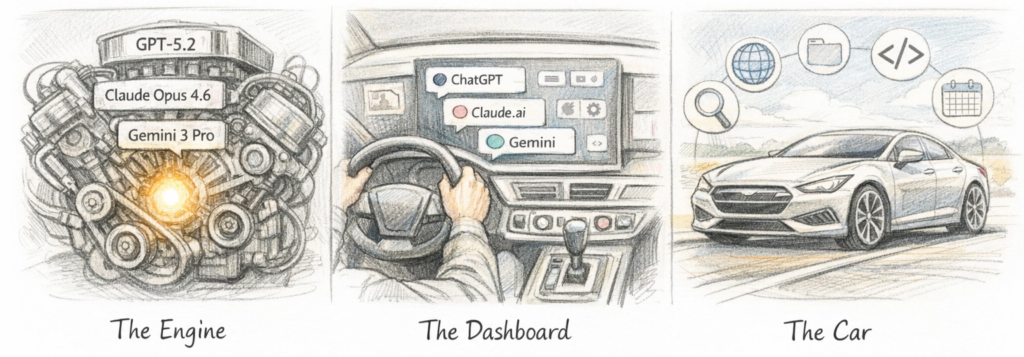
Layer 1: The Engine (AI Model)
This is the AI brain.
The big three right now: OpenAI’s GPT-5.2/5.3, Anthropic’s Claude Opus 4.6, and Google’s Gemini 3 Pro.
The engine determines how much power you have under the hood.
How well the AI reasons, writes, analyzes data, and interprets your uploaded documents.
When someone says “Claude writes better” or “ChatGPT does better math,” they’re comparing engines.
Layer 2: The Dashboard (Interface)
This is where you sit and interact with the engine.
ChatGPT.com. Claude.ai. Gemini.google.com. Their phone versions.
Same engine can sit behind very different dashboards.
Some are clean and intuitive, others bury the controls you need most behind menus and dropdowns.
The dashboard determines how easily you can access the power that’s already there.
(Although google has a great AI model or the engine, there’s much to be desired in terms of the interface itself.)
Layer 3: The Car (Agentic Harness)
This is what takes raw engine power and makes it go somewhere.
A harness gives the AI access to tools: web search, code execution, file creation, your calendar, your documents.
Without a car, an engine just sits on a block.
Without a harness, an AI just chats.
The same Claude Opus 4.6 engine behaves very differently when it’s running on the basic claude.ai dashboard versus when it’s inside Claude Code or Cowork, a far more capable car that gives it a virtual computer, a web browser, and the ability to autonomously build and test software for hours.
Why does this matter for you? Because the question “which AI should I use?” now depends entirely on what you’re trying to DO with it.
And most researchers are blaming the engine when the real problem is they’re driving the wrong car. Or they haven’t even looked past the dashboard.
(I will be writing more about Claude Cowork and Claude Code in the coming weeks.)
For Clinical Researchers: What Actually Matters
Let me cut through the noise (and save you from tool overwhelm).
1. Pick ONE platform and pay the $20/month.
ChatGPT, Claude, or Gemini.
Any of the three.
The paid tier gets you access to the advanced models that produce work-quality output.
The free tiers optimize for speed and friendliness, not accuracy. Most of the “AI is dumb” screenshots you see on social media? Those are from people using free models or letting the system auto-select a weaker one.
(Hallucinated citations are rare with extended thinking and web search turned on.)
2. Always manually select the most powerful model.
This is the single most impactful thing you can do, and the AI companies make it oddly difficult.
For ChatGPT: Select GPT-5.2 Thinking Extended (not just “GPT-5.2,” which is auto-mode and often picks a weaker model for you).
For Claude: Select Opus 4.6 and turn on Extended Thinking.
For Gemini: Select Gemini 3 Pro or Thinking.
Think of it like statistical software. You wouldn’t run a machine learning model on the lite version of a stats package and then blame the software for not being able to run it. Same principle.
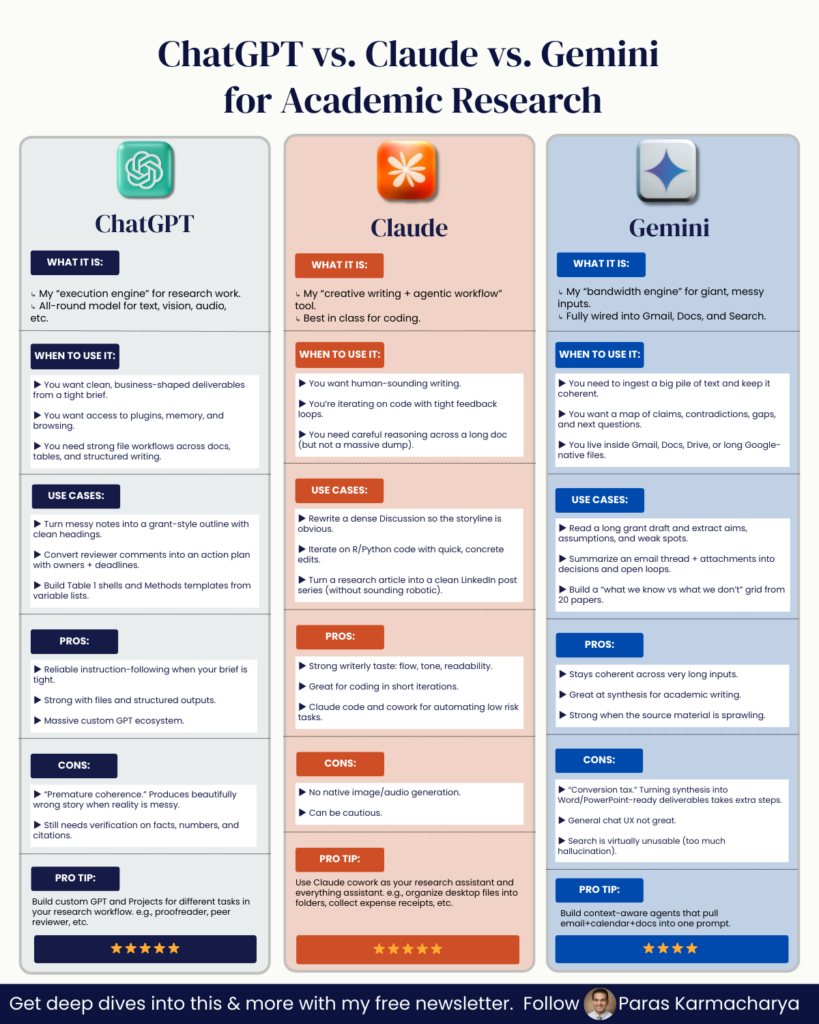
3. Understand what each platform does well for research.
Here’s my breakdown, focused on what matters for manuscript writing, literature review, and research analysis:
Claude (claude.ai): My primary recommendation for academic writing and manuscript development. Strong reasoning, excellent at structured writing tasks (like drafting discussion sections or responding to reviewer comments), and produces clean citations with sources you can verify. The harness on claude.ai now includes code execution, file creation (Word docs, spreadsheets, presentations), and deep research.
ChatGPT (chatgpt.com): The widest range of bundled features. Deep Research, image generation, shopping research, study mode, and strong code execution. Also produces Word docs, spreadsheets, and PowerPoints with verifiable citations. GPT-5.2 Thinking Heavy and especially GPT-5.2 Pro (at higher price tiers) are remarkably capable for complex statistical and analytical work. This is where I still go for heavy quantitative reasoning and when I need the broadest feature set in a single interface.
Gemini (gemini.google.com): The model itself is on par with the others. But the harness is weaker for researchers right now. It can’t produce downloadable documents like Word files or spreadsheets the way Claude and ChatGPT can. Where Gemini stands out: Google’s NotebookLM, a separate interface that lets you upload papers, clinical guidelines, and study protocols, then query them, generate summaries, create slide decks, and even produce AI-generated podcast discussions of your material. If you regularly need to synthesize a pile of documents, NotebookLM deserves a look.
4. The big shift: from chatbot to agent.
This is the change you need to pay attention to.
A chatbot responds to what you say. An agent does what you assign it.
Anthropic’s Claude Cowork runs on your desktop and can work with your local files and browser. You describe an outcome (“organize these manuscript reviewer comments into a response table” or “pull data from these PDFs into a spreadsheet”) and Claude makes a plan, breaks it into subtasks, and executes them while you watch. Or while you do something else.
I have been a long-time ChatGPT user. It was my default for most things. Then Anthropic launched Claude Code and Claude Cowork, and after spending the past month working with both tools daily, I’ve mostly switched to Claude as my primary interface. Last week, I compiled all my tax documents and made a spreadsheet of all my expenses with it. I do not use Quickbooks or any other software and had not strategically collected my invoices, so just organizing them would have taken me days. And cowork did it in a matter of hours.
Having used Cowork for the past month, I’m confident this is going to change the way we do research. It’s the most accessible harness for agentic AI that I’ve seen so far. You don’t need to write code. You don’t need to understand APIs. You describe what you need done, and it goes and does it. For clinical researchers who are already stretched thin, that distinction matters more than any model benchmark.
My Practical Recommendation for Researchers
If you’re just starting with AI for research: Pick Claude or ChatGPT.
Pay the $20.
Select the advanced model manually every single time.
Upload a real document you’re working on.
A manuscript draft. A dataset. A set of reviewer comments.
Give the AI a specific, structured task using a framework like Persona(l) GOAL (which I detail in my prompt engineering guide for clinical researchers).
Persona(l) GOAL in 30 seconds:
- (P) Persona: Tell the AI who to be (“You are an expert medical writer experienced in reporting clinical trial data”)
- (G) Goal: State exactly what you need (“Draft three paragraphs for the limitations section”)
- (O) Output: Specify the format (“Bulleted list with 1-2 sentence explanations each”)
- (A) Avoid: Say what NOT to do (“Don’t suggest future research directions here”)
- (L) Lens: Give the context (“This is a Phase III RCT manuscript targeting JACC”)
Try the deep research feature on your platform of choice. Start thinking about how you can assign tasks, not just ask questions.
The move from chatbot to agent is the biggest shift in how researchers can use AI since ChatGPT first appeared.
Yes, it’s still early.
Yes, these tools will still at times produce baffling outputs.
Yes, you will still need to verify everything they give you.
An AI that does your work is more useful than an AI that talks about your work.
And learning to use it that way: learning to pick the right engine, read the dashboard, and drive the car, is worth every minute you invest.
The researchers who figure this out now won’t just publish faster.
They’ll have more time for the part of research that no AI can do: the thinking, the clinical intuition, the questions that come from years of seeing patients and reading the literature with a critical eye.
That’s still yours. It always will be.
Now go use these tools on something real.
PROMPT OF THE WEEK
Pick any pro AI model and use the below prompt to brainstorm.
Academic Research Deep Dive
Prompt: I’m researching [specific topic or concept]. Please help me map the academic landscape around it by identifying and analyzing key works.

Specifically:
Identify foundational and influential academic or philosophical studies that:
Explore [topic] directly
Connect through related or underlying concepts
Offer fresh, interdisciplinary, or unexpected perspectives
For each major work, include:
Its central argument or finding
Why it matters to understand my topic
Any distinctive methodology or theoretical lens used
Its influence on later research or public thought

Highlight:
Surprising or novel links between disciplines
New frameworks that shift how we think about the topic
Contrarian or underexplored perspectives that challenge the mainstream view
Lesser-known works that offer deep or original insights
Summarize any major debates or contrasting schools of thought within the literature.

Finally, recommend the best entry points for deeper exploration based on my particular interest in [specific aspect of the topic].
P.S. Research Boost is a smart AI agent for academic writing that combines best-in-class AI models chosen by extensive evaluation for individual steps in the outline, literature review, and writing process to get you the best possible manuscript drafts with todays AI.
Sign up for a free trial here: http://researchboost.com/