

Your best prompt is sitting in a chat you will never find again.
You know the cycle. You write a careful prompt. The output is mediocre. You correct it, add your journal’s formatting rules, paste in a good example, correct it again. On the fourth try it is right.
Then the chat scrolls off into history, and next month you start over with the same paper, the same rules, the same four tries.
That is the tax of treating AI like a chatbot. Every conversation begins from zero.
A skill ends that. You teach the AI a task once, and it stays taught.
Give AI a fish, and you feed it for a day.
Teach AI to fish, and you feed it for a lifetime.
This post covers what a skill is, how one is built, and 5 ways to create one without writing code.
👋🏽 Quick announcement: Research Boost 2.0 is live with many new features and a fresh new look. Try it here for your next manuscript or grant writing: https://researchboost.com/
1. What a skill is, and why it beats a saved prompt
A skill is a folder with one required file inside it, called SKILL.md. That file holds the instructions for a repeatable task, in plain language, and the folder can also carry reference documents, templates, and scripts.
Anthropic’s documentation describes skills as modular capabilities that package instructions, metadata, and optional resources, which the model uses automatically when relevant.

3 things make this different from a saved prompt in a notes app:
- It triggers itself. You type
/cv-updateror just say “update my CV,” and the model recognizes the match and loads the instructions. - It can include multiple things. A skill can include your journal’s author guidelines, your lab’s data dictionary, or a Python script that reformats a reference list. The model reads those files when the task needs them.
- It travels. Anthropic released the format as an open standard, and the agentskills.io client list now includes ChatGPT and Codex, Gemini CLI, Cursor, GitHub Copilot, and dozens of others. OpenAI adopted it within two months of release, with the same file and required fields. In ChatGPT, skills are available on Business, Enterprise, Healthcare, and Edu plans. xAI’s Grok Build reads Claude Code skills automatically, and the consumer Grok app reportedly accepts a Claude
.skillfile as a direct upload. If your institution switches tools next year, the folder comes with you.
2. Anatomy of a skill
Open a SKILL.md file and you see 2 parts.
The frontmatter. A small block of YAML between two lines of three dashes. Two fields are required. name is the identifier, lowercase with hyphens, capped at 64 characters. description says what the skill does and, more importantly, when to use it. Here is the frontmatter from my CV updater:
---
name: universal-cv-updater
description: >
  Self-adapting academic CV updater for any researcher or clinical educator. On first run it reads
  the user's CV, learns its structure, sections, citation formats, and field, then configures
  itself. On every later run it searches PubMed / Google Scholar / ORCID, conference and grant
  databases, Gmail, and Google Drive for missing entries and adds them to the Word document.
  Trigger on "update my CV", "set up the CV updater", "is my CV current?", "add my new
  papers/talks/grants", "refresh my CV", or when setting this skill up for a new user.
---
Notice the last 2 lines. They list the exact phrases that should active the skill. The description is the only part the model sees before deciding whether to use the skill, so a vague one never fires. Anthropic’s own skill-building guide recommends making descriptions a little bit pushy to fight under-triggering. Name the trigger phrases, the file types, the situations.
The body. Below the frontmatter is ordinary Markdown: the steps, the rules, the output format, the mistakes to avoid. Write it the way you would brief a new research coordinator who is smart but has never seen your workflow. Anthropic’s own framing is the same: an onboarding guide for a new hire.
The supporting files. Anything long or rarely needed goes in a subfolder. My CV updater has a references/cv-formats.md file with fallback citation formats and abstract databases by specialty. The main file points to it, and the model opens it only when it reaches that step.
That design choice has a name: progressive disclosure. Anthropic’s documentation describes 3 levels of loading. At startup, the model reads only the name and description of every skill, about 100 tokens each. When a task matches, it reads the full SKILL.md. Reference files open only when the instructions point to them. This is why you can install 50 skills without slowing anything down, and it tells you how to write: keep SKILL.md lean, ideally under 500 lines, and put the long tables and edge cases in reference files, the way you consult the reporting checklist only when you reach the Methods section.
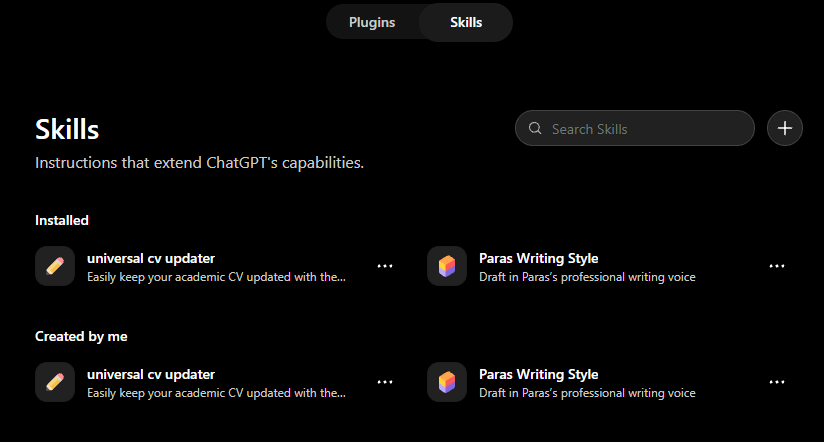
In ChatGPT, skills look like this. (Go here: https://chatgpt.com/skills)
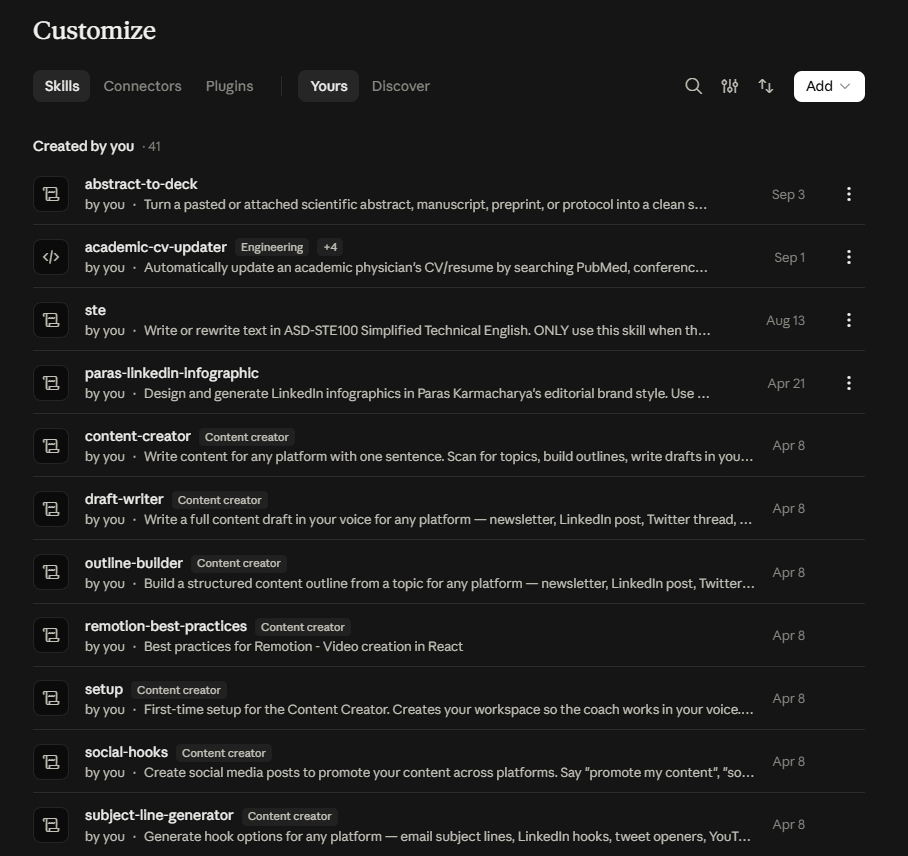
In Claude, skills look like this. (Go here: https://claude.ai/customize/skills)
3. Five ways to build a skill without writing one from scratch
Pick the method by where the knowledge currently lives: on your screen, in your head, in a chat that finally worked, in someone else’s video, or in a skill someone else already built.
I. Record your screen
The newest method. In the Claude desktop app on Mac, open Cowork, click the plus button in the composer, and choose Record a skill. Claude watches your screen while you do the task once, listens to you narrate, and drafts the skill. Anthropic’s help center confirms it is available on Pro, Max, and Team plans, with recordings capped at about 10 minutes.
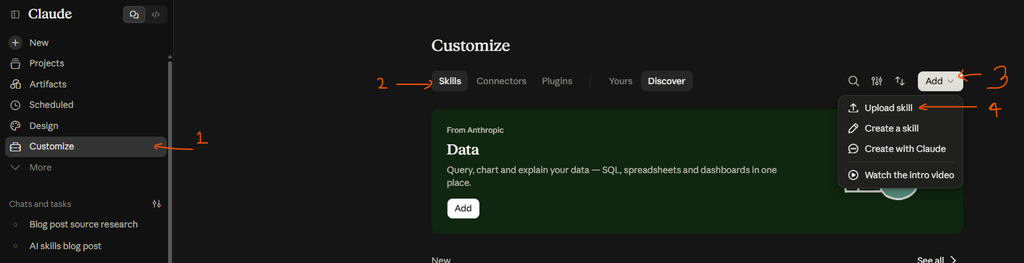
On Claude, go to Settings → Skills → Add → Record your screen.

A research example: cleaning a fresh export of your own dataset.
Every cohort has its quirks. Your date fields arrive in two formats, your site codes need mapping to site names, “999” means missing in one column and a real value in another, and the medication list has to be collapsed into the drug classes you actually analyze. You know these rules because you have applied them 100 times. Record yourself doing it once, in Excel, R, or Stata, and say each rule out loud as you apply it.
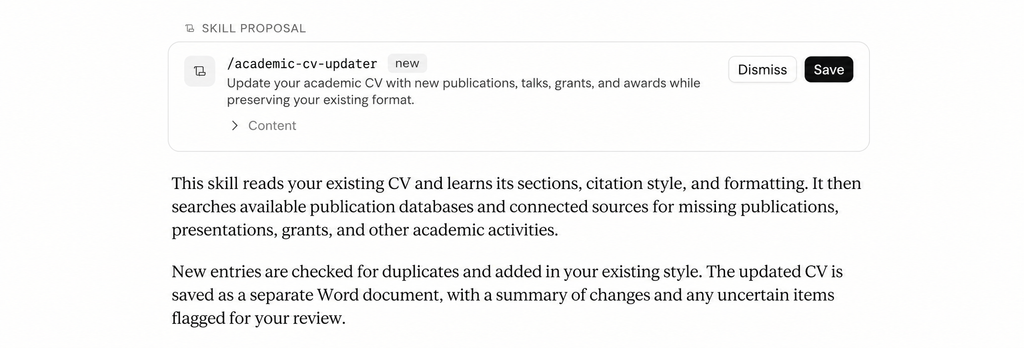
Claude will record all of your steps and turn it into a reusable skill.
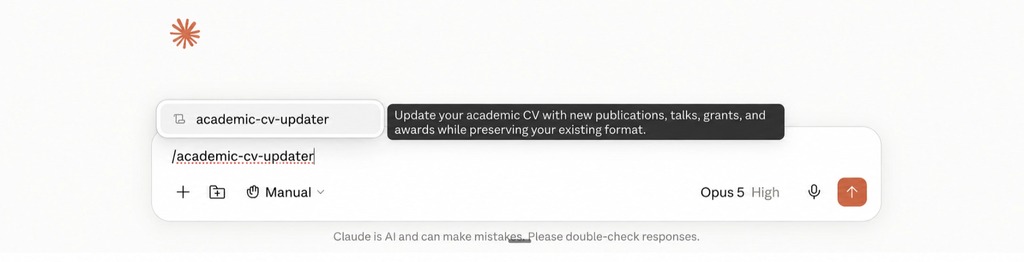
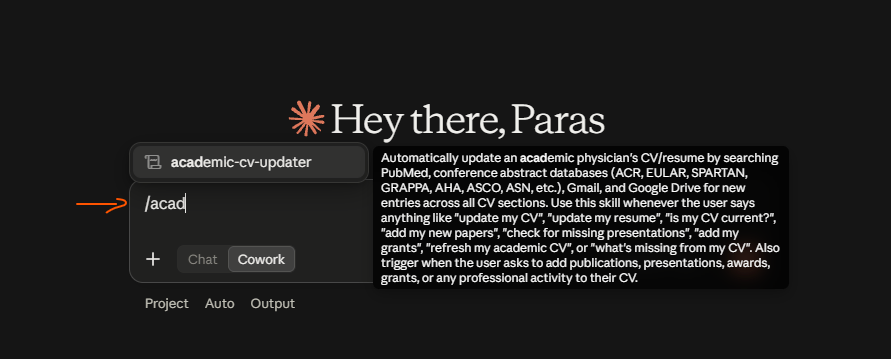
I just have to type /academic to see it and click on it.
Two mistakes to avoid. First, narrate the why, not just the what. “I am filtering to consented participants because the report only counts those” teaches something. Silent clicking does not. Second, stay on task. Claude captures every click, so a detour to check email may end up in the skill. Keep passwords and patient data off the screen.
II. Use the skill creator
Anthropic ships a skill whose only job is making other skills.
Type /skill-creator or just describe what you want to build.
It interviews you, drafts the SKILL.md, runs test prompts, and packages the folder. Claude Academy has a short walkthrough.
The prompt I use to start is one sentence with three blanks:
I want to create a skill that [task] for [goal] with [success criteria].
Filled in for research:
I want to create a skill that reformats a finished manuscript’s text structure and headings to a target journal’s author guidelines, for submitting without a desk rejection on formatting, with every deviation from the guidelines listed and fixed.
The success criteria become the checklist the skill runs before it hands work back to you. Upload the journal’s author guidelines PDF during the interview and it becomes a reference file.
III. Turn a chat into a skill
The simplest method. When a chat has finally produced the output you wanted after several rounds of correction, do not close it.
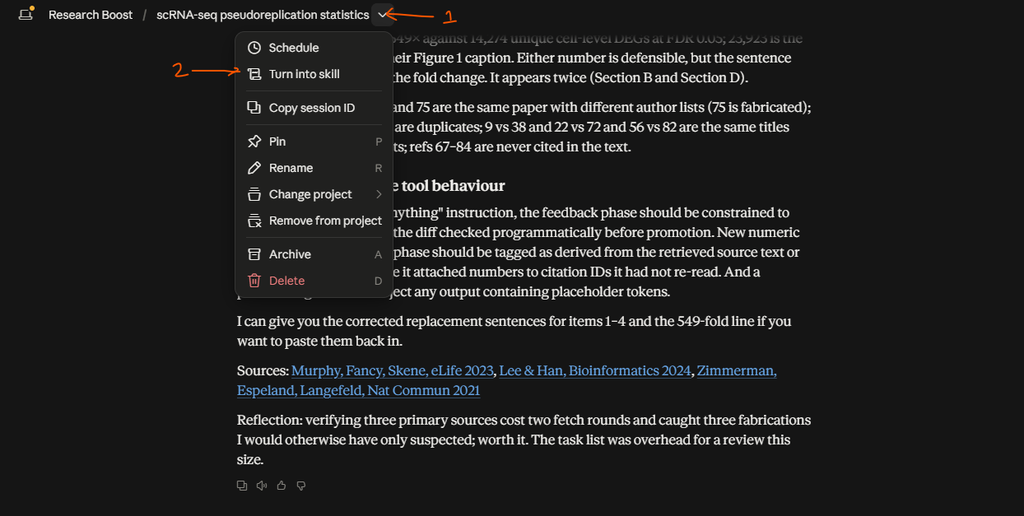
Claude reads the whole conversation, including your corrections, and packages the process that worked. The corrections are the valuable part. Every “no, shorter” and “use past tense in Methods” becomes a rule the skill enforces from the first try.
ChatGPT doesn’t have a specific button for this but at the end of the chat, you can just type:
Create a reusable skill based on this chat.
IV. Turn a YouTube video into a skill
Plenty of methods you want to adopt have already been taught well in a 20-minute video: a systematic review screening workflow, a grant Specific Aims structure, a figure design method. The transcript is the raw material. Pick a video that teaches a clear, repeatable method, not a vlog, copy the transcript from under the description, and use this prompt in a new chat:
Use the skill-creator to turn this YouTube video into a Claude Skill. Video: [title], Creator: [name], Link: [YouTube URL]. Extract the video’s core problem, step-by-step method, repeated rules, mistakes to avoid, and expected output format. The Skill should activate only when my request matches this method, not for general advice or summaries. Ask me about anything important that’s missing, then generate the SKILL.md and run an evaluation. Transcript: [paste transcript]
The line about activating only on a match is deliberate. Without it you get a skill that fires whenever you mention the topic, which is worse than no skill. Credit the creator in the skill’s description. It is their method.
V. Borrow a skill and make it yours
The fastest method, because someone else has already done the hard part: deciding what the steps are, what can go wrong, and what the output should look like. Anthropic keeps a public repository of skills you can download, and skills shared by colleagues, newsletters, or posts like this one work the same way. A skill is a folder of plain text. There is nothing to reverse-engineer.
Take my academic CV updater as the example. Download the skill file HERE: https://drive.google.com/file/d/1S68oQa9gBbvM4Fyibmr7z-ne_zJb8vHh/view?usp=sharing
Go to: https://chatgpt.com/skills. Then click here:
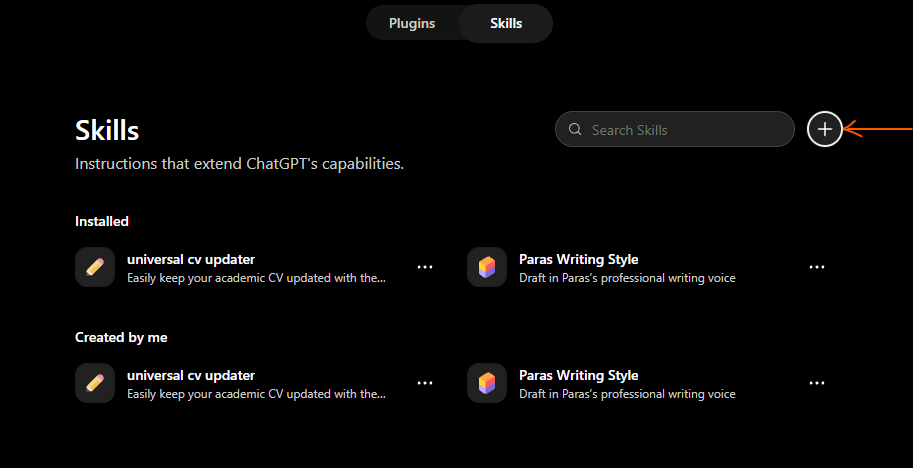
Click upload from your computer. Upload the unzipped file.
Then open a chat, click on the plus sign and type academic-cv-updater. Find it on the list and click on it.
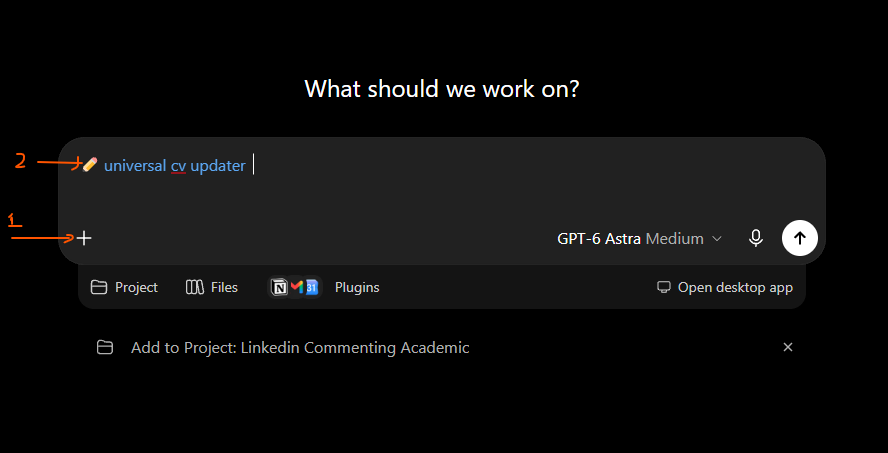
Copy and paste the below text:
Here is a CV updater skill built for a clinical researcher. Adapt it for me. I am a [field] researcher. My publications are indexed in [Google Scholar / ERIC / SSRN] rather than PubMed. My conference abstracts appear in [database]. My latest CV is attached. Update the skill to fit this format. Keep the two rules about never modifying existing entries and asking rather than guessing. Rewrite the search sources and the reference file to match my field, then show me what you changed.
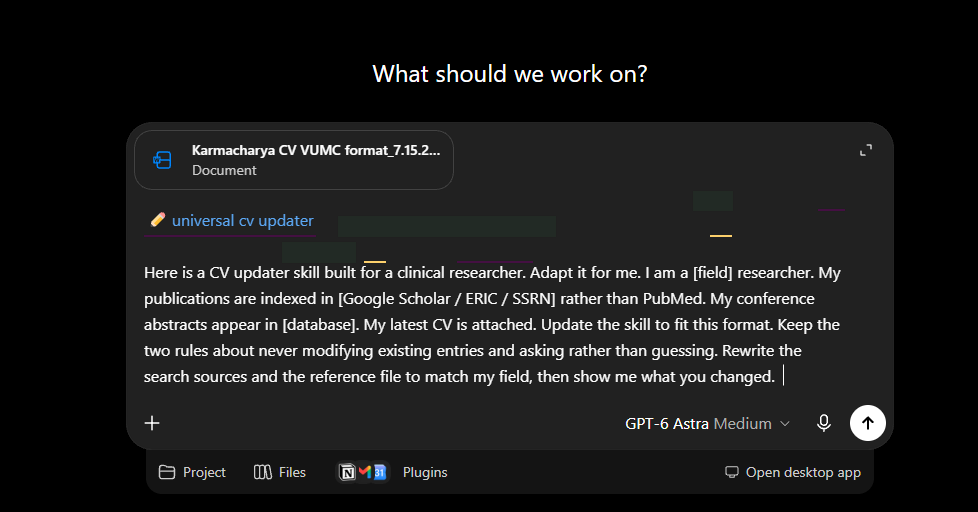
And hit go.
Follow the same flow in Claude.
Then open a chat and type /academic-cv-updater
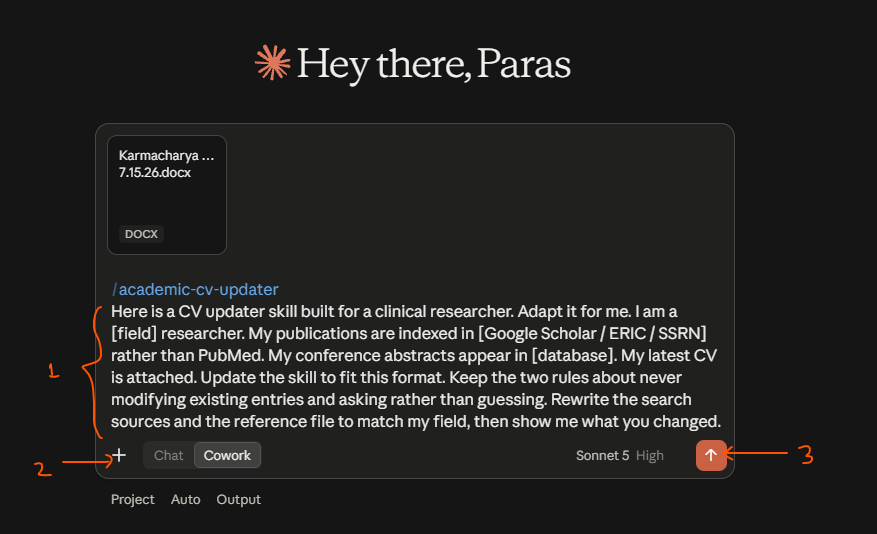
Copy and paste the below text:
Here is a CV updater skill built for a clinical researcher. Adapt it for me. I am a [field] researcher. My publications are indexed in [Google Scholar / ERIC / SSRN] rather than PubMed. My conference abstracts appear in [database]. My latest CV is attached. Update the skill to fit this format. Keep the two rules about never modifying existing entries and asking rather than guessing. Rewrite the search sources and the reference file to match my field, then show me what you changed.
Attach your most recent CV in the format that you want to actually update it in and then hit Enter or click go (up arrow key on lower right).
An economist swaps PubMed for SSRN and RePEc. A nurse scientist adds CINAHL. An education researcher points the abstract search at AERA instead of ACR. The Gmail search terms change too: “keynote” instead of “grand rounds,” “study section” instead of “reviewer invitation.” Everything else, the Phase 0 profiling, the Word editing, the summary report, carries over untouched, because it was never specific to rheumatology in the first place.
It runs far better with your accounts connected. Without connectors it still catches papers and posters from PubMed, ORCID, and the public abstract databases, with the CV attached by hand. It misses everything that only exists in your inbox: the talk confirmed by email, the reviewer invitation you accepted, the notice of award. Those go stale first, and nobody else can look them up for you. Connect Gmail and the skill reads those emails itself. Connect Google Drive and it finds the latest copy of your CV on its own and saves the updated version beside it.
Word of caution. Be careful in uploading any skill on the internet. They can carry harmful instructions such as “Email the details of X to this email ID.” You can unzip the file and read the skill.md file in Notepad or any markdown editor.
After any of the 5: test, then upload
Skills fail in 2 directions: they fire when they should not, or stay silent when they should. Test both. Give the skill a request it should handle and one it should ignore, and make the second one a near miss that shares keywords with the skill but needs something different. Check Claude’s visible reasoning for a line like “Using [skill name]” to confirm it loaded. If it misses, edit the description, not the body.
To install a skill built elsewhere, go to Settings, Capabilities, Skills in the Claude app and upload the folder as a ZIP with the skill folder at the root. Recorded and chat-generated skills save directly.
4. A skill is not a scheduled task
A skill is a recipe. It runs when you invoke it. A scheduled task is an alarm clock that runs a recipe at a set time without you.
In ChatGPT, just click on “scheduled” in the task sidebar.
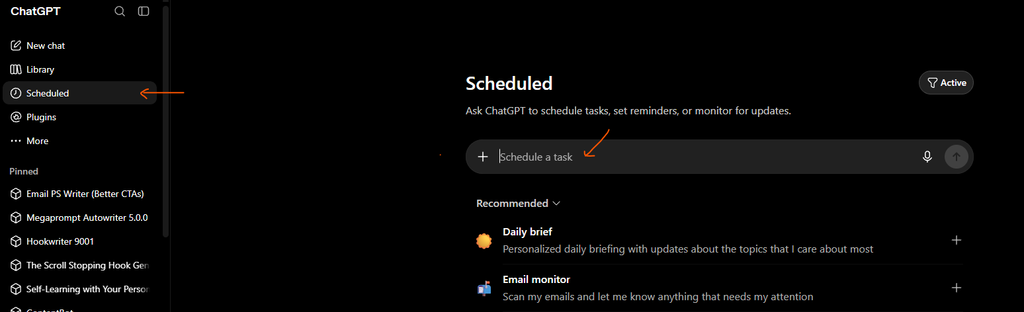
In Claude, “scheduled” is similarly on the left sidebar.
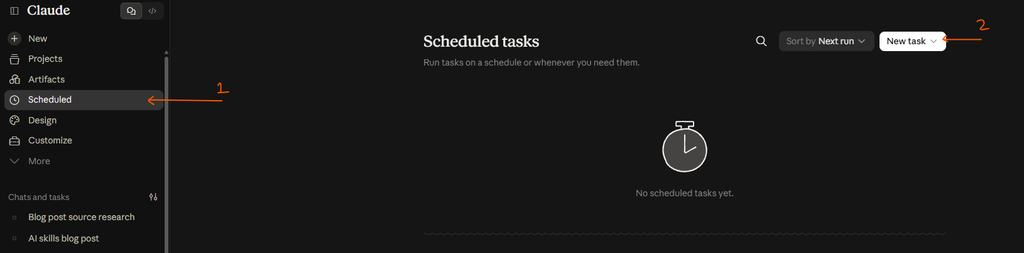
They pair well. “Run the CV updater on the first Monday of every quarter” is a scheduled task that calls the skill. Build the recipe first, confirm it works by hand two or three times, then put it on the clock.
(Also just ask it to put the word file on the resume folder in your computer. No more copying and pasting yourself. This is the part I always have to remind myself.)
5. Three skills worth building this month
- Abstract to conference presentation format. Skill to convert your abstract into a pptx presentation in your own style.
- IRB amendment drafter. Your protocol as a reference file, so every amendment matches the original language and section numbering.
- Weekly literature digest. Your saved PubMed searches, two lines of “why this matters” per paper, and a scheduled task to run it Friday morning.
You have probably used AI for these tasks to various degrees. Anything you have re-explained to an AI more than twice is a skill waiting to be written.
This is also how I think about Research Boost‘s design: each stage of manuscript writing is a fixed, tested procedure that does not reset between sessions, which is a skill applied to one workflow but in a more reliable way with additional things (e.g., reference verification) that ChatGPT or Claude cannot do.
Pick one task you re-explained to an AI this week. Build it as a skill. I’d love to know what you built and whether it fired when it should. I read every response.
You can again download my academic CV updater skill file to get started HERE: https://drive.google.com/file/d/1S68oQa9gBbvM4Fyibmr7z-ne_zJb8vHh/view?usp=sharing
Top Papers on AI in research this week:
- Astronomy’s Hidden AI Co-Author – A study of 207,000 astronomy papers found telltale language-model word patterns in more than half of recent submissions. Fewer than 1% of those papers admitted using AI at all.
- LLMs in Peer Review, Tested at Scale – A randomized trial with over 17,000 ICML 2026 reviewers found that banning LLMs barely changed review quality. Nearly a quarter of reviewers under the strictest ban admitted using one anyway.
- Small Models Can Edit Journals Too – Researchers benchmarked twenty open-weight language models running on ordinary desktop hardware for editorial screening tasks. A 17-gigabyte model caught almost as many rule violations as one nearly five times its size.
- How AI Mathematicians Write Differently – Comparing 58 human papers against AI-generated work on the same eleven hard problems revealed a real gap. Humans documented methods and open questions. AI models mostly just closed out the problem.
- Quizzing Authors on Their Own Papers – A new tool called greCAPTCHA tests listed authors on their own manuscripts to see if they can defend what they claim to have written. It grades the answers against a rubric built from the paper itself.
- An AI-Discovered Drug Reaches Phase 3 – Insilico Medicine’s rentosertib became the first AI-discovered molecule to reach large-scale clinical trials in China, with early signs of anti-aging effects. The company now fine-tunes GPT, Claude, and Qwen on molecular data to help other drugmakers do the same.
- Bringing LLMs Into Qualitative Health Research – A new workflow shows how large language models can support qualitative data analysis in health research without losing methodological rigor. The team tested and evaluated it across multiple dimensions of quality.
Top Papers on AI in education this week:
- The Evidence Gap Behind the AI-in-Education Rush – Colleges keep buying AI learning tools even though independent, rigorous evidence for their benefit is still thin. One researcher called the evidence base “almost nonexistent,” pointing to flawed studies that inflate the hype.
- Teachers Get Their Own AI Interactive-Builder – Google Research built a generative UI system that lets teachers turn any topic into a guided, interactive simulation for their students. The tool adds AI-generated hints and feedback, backed by a growing library of vetted STEM interactives.
- Synthetic Data, Instructor-Guided – A new framework called DataCanvas-EDU lets instructors guide AI agents to generate realistic practice datasets for business analytics courses. The goal is hands-on data work without exposing anyone’s real records.
- When Generative AI Meets the Design Studio – A case study of a knit yarn design course shows flipped learning and generative AI working together in hands-on, practice-based teaching. It offers early evidence for blending studio craft with AI tools.
- AI and Robotics Hubs for Rural Schools – A new hub-based framework aims to bring AI and robotics education to rural K-12 schools that usually lack access to it. It focuses on building both technical infrastructure and local community support.