

Claude’s latest AI model, Fable 5 was banned last week. Here is exactly what happened, and why it should change how you think about AI in your research.
For two years, most of us assumed there was no ceiling. Each AI model was better than the last. We planned our studies, our analyses, and our writing around a quiet bet that the line would keep climbing. Then one letter changed the math. The most capable AI model available to the public went dark, fast, for everyone.
Maybe Fable 5 comes back. Maybe a different model takes its place. The specific name does not matter. But the pattern does. We are probably not going to keep getting access to better and better models forever. At some point a government, a regulator, or an AI lab itself decides a frontier model is too capable to hand to the general public. Researchers are not exempt from that decision.
That single event exposed how much we have built on ground we do not own.
1. Why open models are suddenly on every researcher’s radar
Two forces are pushing in the same direction.
The first is access. You just watched the strongest model on the planet disappear with no warning and no appeal. Anything you build on a rented model can be revoked by a policy change, a price change, or a terms update you never read.
The second is money. The frontier labs are losing it, and not by a little. Their flagship subscriptions are priced far below what heavy users actually consume.
SemiAnalysis stress-tested every tier from OpenAI and Anthropic. They bought the plans, ran long coding and agent tasks until the weekly limits were exhausted, then priced that usage at standard API rates. A maxed-out $200 Claude Max plan represented up to $8,000 in API-equivalent usage. ChatGPT Pro reached as much as $14,000. Even the cheap $20 plans were estimated at roughly $700 of usage on ChatGPT and $400 on Claude.
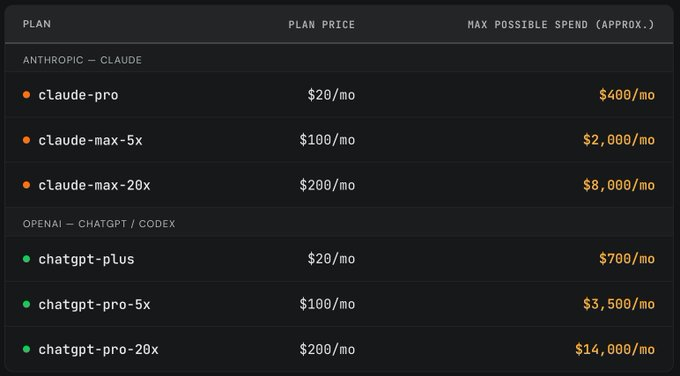
(Source: SubAnalysis)
You do not need an MBA to see where that goes. The current pricing is a subsidy. Subsidies end.
2. What $4,000 to read 800 charts taught me
If you only use the chat interface, none of this is visible to you. The cost is hidden behind a flat monthly fee. We run frontier models through the API for Research Boost, so I get a front-row seat to what these models actually cost to run at volume.
Additionally, I was testing an AI chart-review platform to identify psoriasis patients from the electronic health records. Each patient carries mountains of notes, labs, and visit records. I designed the prompt to mirror how a trained human abstractor actually works through a chart, step by step. Then I ran it.
I did not even reach for a frontier model. I used GPT-4.1 Mini, one of the cheaper small models, on a HIPAA-certified platform. The bill for tuning the prompts and run it still came close to $4,000. That was for roughly 800 charts. And I had already used every trick I know to cut token use.
Now extend that to a cohort of 20,000 patients (that is close to how many total patients with at least one code for psoriasis are in our EHR), or a multi-site study, or a workflow you want to run every month. The number stops being a line item and starts being a barrier. For a lot of high-volume research tasks, frontier-model pricing simply does not scale.
3. Keep a generator in the garage
Think about it the way you think about electricity. Most of the time you are happy on the grid. It is cheaper and someone else maintains it. The people who stay running through a storm are the ones with a generator in the garage.
My mentor runs a farm (so cool). And she keeps a generator on hand for exactly those days. When the power drops, her work keeps going. Most of us have never set one up. We trust the grid to hold, right up until it does not.
Open models are that generator. An open or local model is one you download once and run on your own hardware. The frontier cloud models will stay smarter for now. The open ones currently trail them by months, sometimes as few as four, not years. And the gap keeps narrowing. It has briefly closed to zero before, when Llama 3.1-405B was rated on par with the best closed model of its day. The distance between what the public is allowed to use and what an open model can do is shrinking with it.
You do not keep a generator because it beats the grid. You keep it because it works when the grid does not.
The rest of this post is a high-level map of what these models are and how to put them to work in research. I will go deep on the setup in later posts. For today, the goal is to make this a skill you actually own.
4. What an open model actually is
An open model runs entirely on your own computer.
No internet connection. No API key. No per-token cost. No company watching what you type into it.
You download the model file once, and from that point it is yours. It runs on your machine the way a statistics package or an image editor does.
That is the whole concept. The intelligence lives on your hardware instead of someone else’s.
5. Why this matters more for research than for almost anything else
Three benefits come with running the model yourself. For clinical and translational work, they land harder than they do for most other fields.
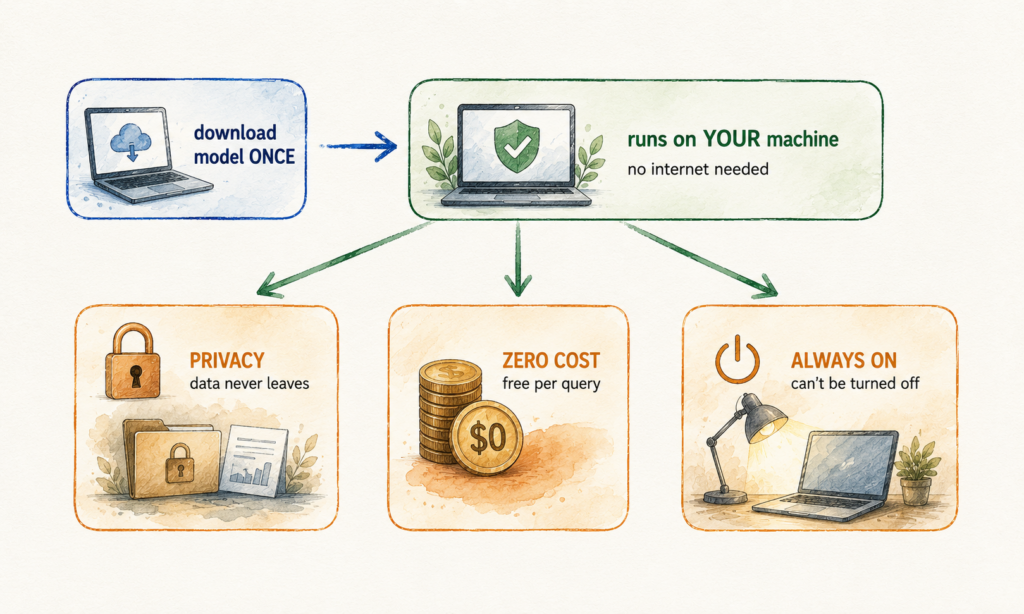
I. Privacy that holds up to a data-use agreement. Your data never leaves the machine. Plenty of data we work with legally (and ethically) cannot be sent to a third-party API. Protected health information. Controlled-tier datasets like the All of Us Controlled Tier. Identified records under an IRB protocol or a data-use agreement. A local model runs inside your secure environment, so you can apply AI to the exact data you are not allowed to upload anywhere. This is not theoretical. In one study, a locally run Llama pipeline extracted clinical features from MIMIC-IV notes, detecting liver cirrhosis with 100% sensitivity and 96% specificity, on modest hardware and without sending a single record off-site.
II. Zero marginal cost on high-volume work. Once you own the hardware, every query is free. Run the model around the clock for a month and your bill is the electricity. That $5,000 chart-review run becomes a fixed, one-time hardware cost spread across every future project. Abstract screening, de-identified note summarization, structured data extraction, and Table 1 drafting are exactly the high-repetition tasks where this changes the math.
III. A model nobody can switch off, including for reproducibility. A cloud model updates silently. A prompt that behaved one way in March can behave differently in June, which is a quiet threat to any analysis you need to reproduce. This is documented. One tracked evaluation found GPT-4’s accuracy on a simple prime-number task fell from 97.6% to 2.4% over three months, with no announcement. A model pinned to a version on your drive does not move under you. It is a stable, citable tool you can describe in your methods and rerun in two years. It also works on a plane, in a secured room, and the week your provider gets cut off.
6. The honest trade-off
Open models are generally not as smart as the absolute frontier. The largest open models can approach cloud quality, but they need serious hardware. The ones that run on a normal laptop sit a notch below the best cloud models.
Here is the reframe that matters. You do not need frontier intelligence for most tasks. You need good-enough intelligence that is private, free, and always on. For a large share of routine research work, an open model clears that bar. In one study, a small open model run behind an institution’s firewall was benchmarked against human reviewers for extracting staging details from pathology reports, as a privacy-protecting path for centers that cannot access the big private models. The skill is matching the right model to the right job.
7. How to get started, in the right order
Most people do this backwards. They go hunting for the perfect model before they can run a single one. Reverse it.
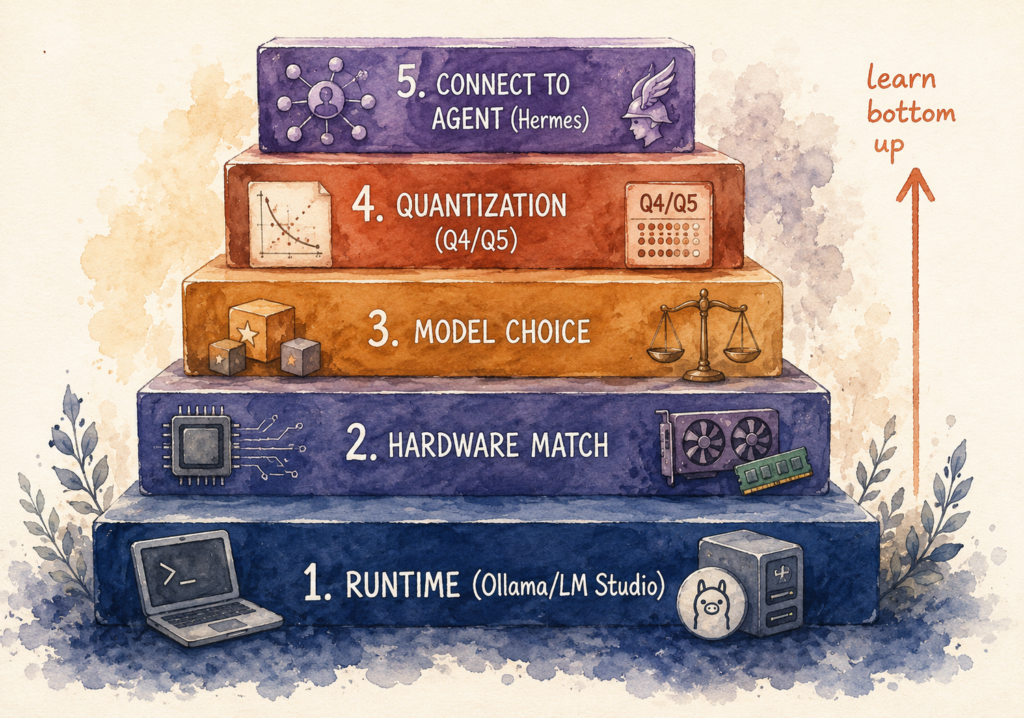
Figure. The local model stack.
1. Install the runtime first. The runtime is the program that runs models on your machine. Two names to know: Ollama, which runs from the command line and tends to be the developer favorite, and LM Studio, which has a real interface and a model browser you can click through. If terminals make you nervous, start with LM Studio. You will have a model running in <10 minutes.
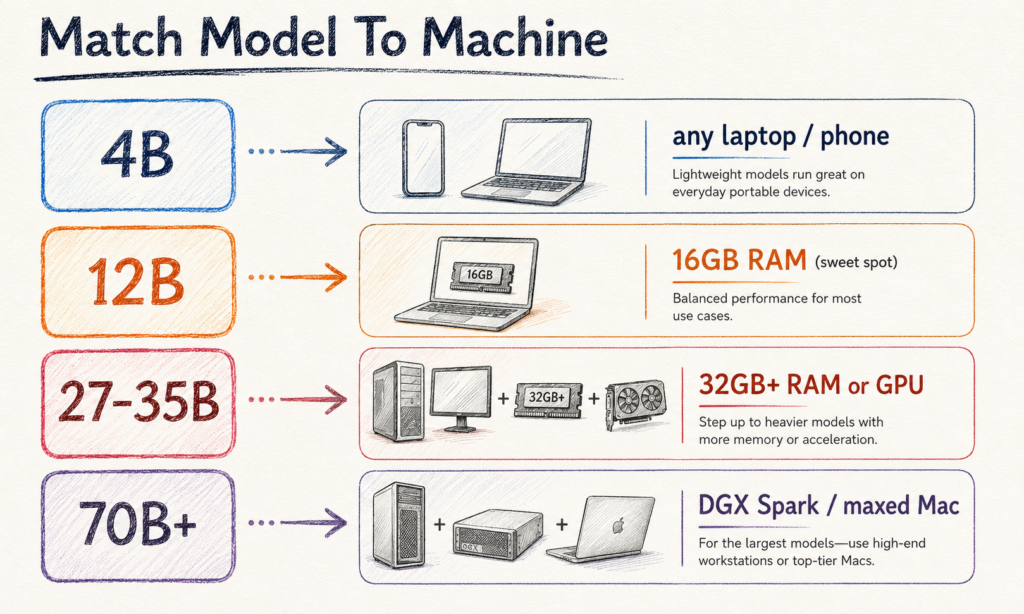
2. Match the model to your machine. Model size is measured in billions of parameters. Bigger usually means smarter, and bigger always means more memory. A 4-billion model runs on almost anything, including an 8GB laptop. A 12-billion model is the sweet spot for a 16GB laptop, which is where most researchers should start. A 27 to 35-billion model wants a strong Mac with 30GB or more, or a dedicated GPU, and is where it starts feeling genuinely capable. The 70-billion class needs a maxed-out workstation or a purpose-built box like an NVIDIA DGX Spark with 128GB of unified memory, the kind of shared machine a lab or core facility buys once.
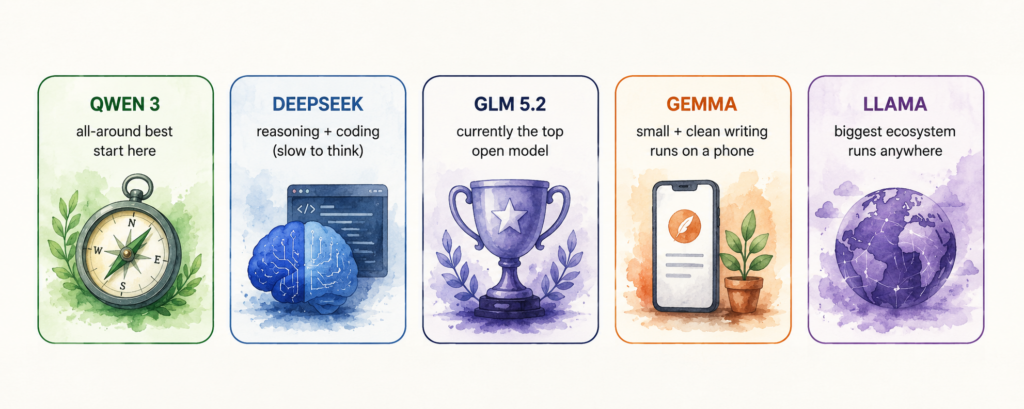
3. Pick a model for the job. Five are worth knowing. Qwen 3, from Alibaba, is the best all-around choice for a single machine, strong at coding and multilingual, which helps when your source notes are not all in English. DeepSeek is good at hard reasoning and analytical problems, though it thinks for ten to thirty seconds before answering. Gemma, from Google, runs small enough to fit a laptop or even a phone and writes clean prose, which makes it useful for drafting. Llama, from Meta, has the largest community and the most fine-tuned variants, so there is usually a version already adapted to biomedical text. And GLM-5.2, from Z.ai, currently tops the open-weight leaderboard and rivals the closed frontier on reasoning and coding. The catch is size. At more than 700 billion parameters it does not run on a laptop. You need a serious workstation or a hosted provider, and if privacy is the point, download the open weights and run them yourself rather than sending records through the vendor’s API.
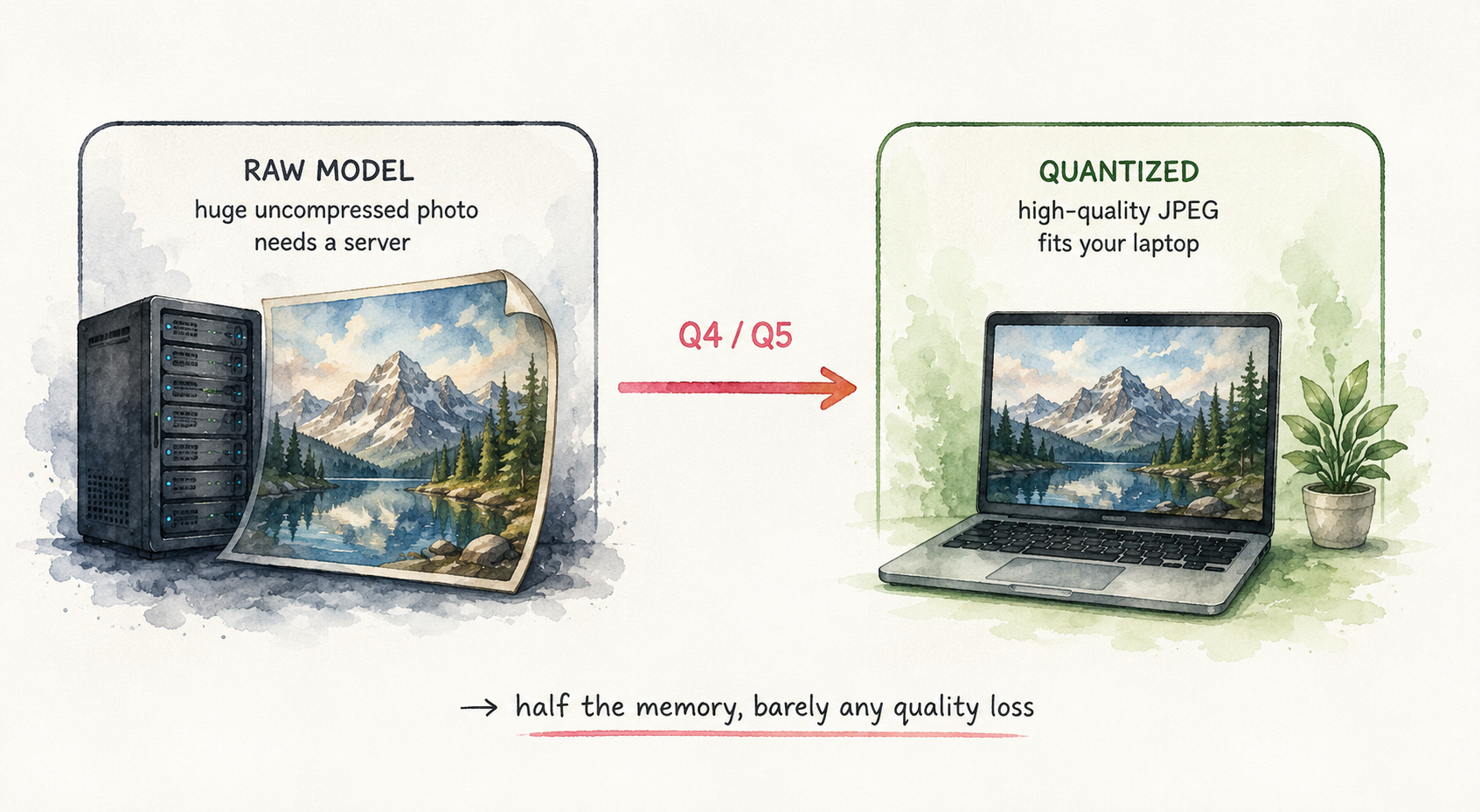
4. Use quantization to fit your hardware. Quantization shrinks a model so it runs on weaker hardware with barely any loss in quality. The analogy is saving a high-quality JPEG instead of a raw image. You will see labels like Q4 or Q5, which mark the compression level. Q4 trims the memory a model needs with minimal quality loss. This is how a model that supposedly needs a server ends up running smoothly on the laptop you already have, so you can start without buying anything.
5. Give it tools and point an agent at it. Chatting with a model is the beginning. The real shift is wiring it to tools and an agent. A small local model with web search, file access, and a code sandbox will outperform a much bigger model that has none. Connect it to a literature search, your de-identified REDCap export, and a stats environment, and it stops being a chatbot and starts being a working assistant. The model is the engine. The tools are the wheels.
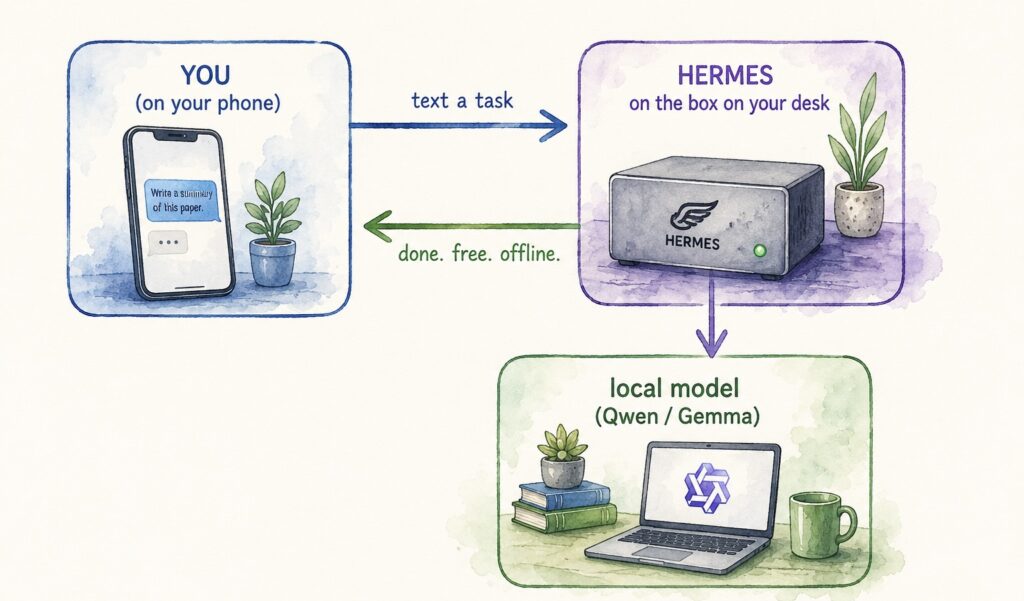
One constraint to respect. Context is your real limit when you run locally, because a bigger context window eats more memory. Keep your sessions tight. Do not dump an entire chart corpus into one thread or the machine will choke. Chunk your records the way you would chunk a manual abstraction.
8. The skill that actually matters: knowing what to run where
Run a small local model next to a frontier model for one week, on real tasks. Screen a batch of abstracts. Summarize a set of de-identified notes. Draft a methods paragraph. You will be surprised how often the free local model is enough, and you will stop reaching for the expensive option for work a 12-billion model handles fine.
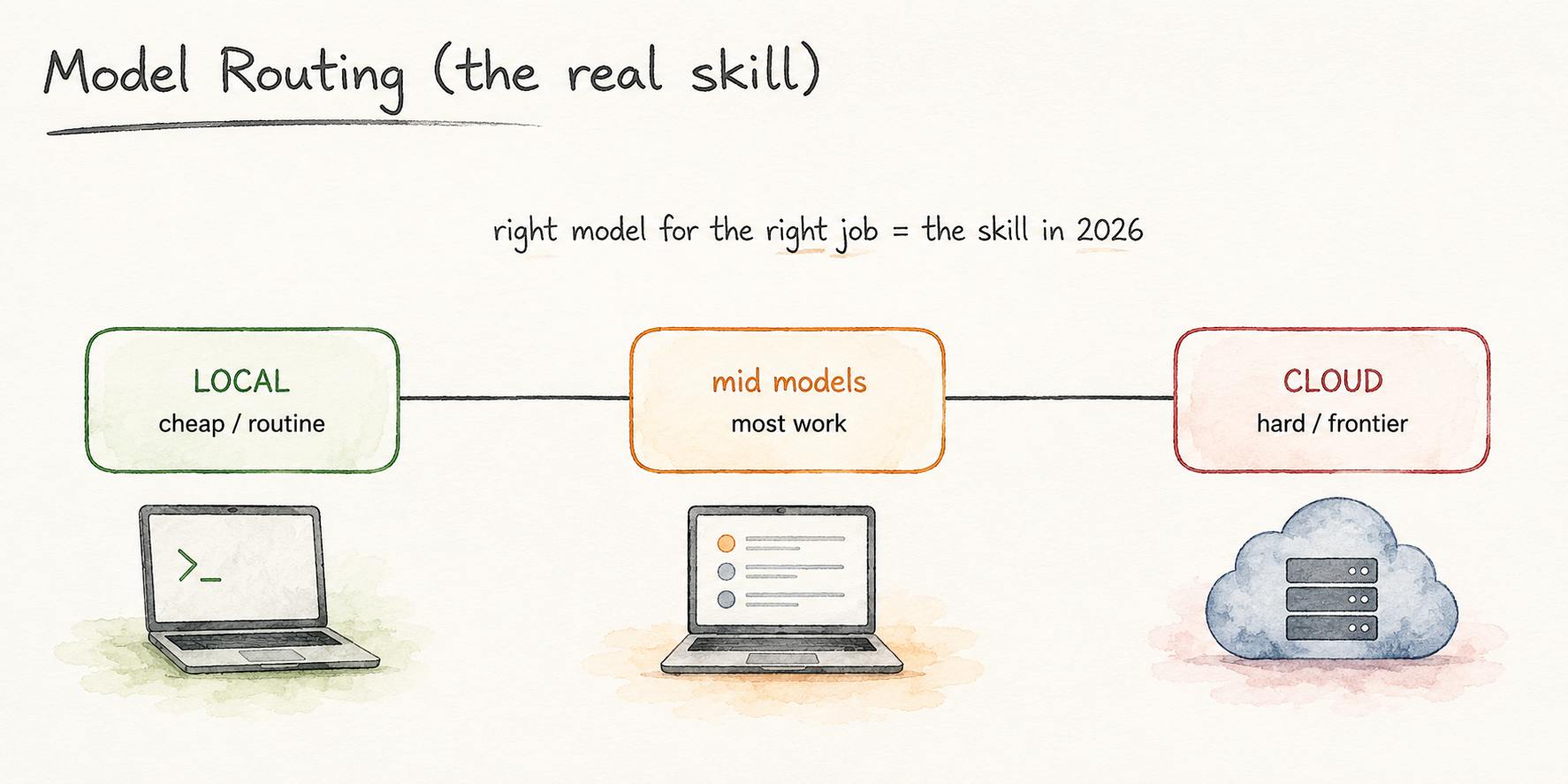
This is the instinct worth building. The advantage comes from learning where each tool is strong and matching it to the task in front of you. The best setup for a researcher runs both. Frontier models handle the hardest reasoning and the most ambiguous judgment. Open models handle the high-volume, sensitive, and routine work that fills most of a research week.
The Fable 5 ban was a wake-up call, not a catastrophe. It told us something we should have known. Do not build your entire research workflow on something that can disappear with a single letter. Own a part of your stack.
So here is the one thing to do this week. Download LM Studio, pull a 12-billion model, and run one real task entirely offline. Screen ten abstracts. Summarize one de-identified note. Then tell me what surprised you. I am building a deeper, step-by-step guide for clinical researchers next, and I want it shaped by where you actually get stuck.
Top Papers on AI in research this week
- Benchmarking LLM Agents on Meta-Analyses – Tests whether LLM agents can reproduce Nature-journal meta-analyses across retrieval, PI/ECO study selection, and statistical pooling. Maps where agents still trail human synthesists.
- Peer-Reviewed Reasoning for Medical Q&A – A multi-agent setup where LLMs answer and critique each other on MedQA. Scoring reasoning quality lifted accuracy and auditability.
- Deep Research Agents for Physical Science – Introduces PhySciBench, 200 expert-written physics and chemistry questions, plus a multi-agent framework for autonomous reasoning.
Top Papers on AI in education this week
- Do LLM Tutors Teach or Just Solve? – A diagnostic separating problem-solving from teaching support. The two correlated at just 0.42 across 8 models.
- The AI Literacy Continuum – Liu and Levy frame AI literacy as a five-stage path. Literacy is knowing when, and whether, to use AI.
P.S. Research Boost is now live. You can use it as an academic writing partner for writing your next manuscript or grant. Try it FREE: http://researchboost.com/