

A new kind of AI launched on September 15. It’s called Jev.
Within days, demand was so high that the company stopped accepting new sign-ups.
The strange part is that Jev can’t write (at all). It can’t draft your Discussion. It can’t summarize a paper.
It picks an answer from a list you give it. That’s all.
And I think it could change how we do clinical research.
What happened in the first 24 hours:
- It became the fastest-adopted AI model ever on Vercel’s AI Gateway, a service developers use to access models from every major AI company.
- More than twice as many paying teams signed up for it as for any model before it. By hour 24, nearly 13% of paying teams on the gateway were using it.
- Then demand outran capacity, and sign-ups were paused.
When thousands of developers rush toward an AI that can’t write, it’s worth asking what they see.
In this post I’ll talk about what Jev is, how you can set it up, and what you can use it for.
In this post I’ll talk about what Jev is, how you can set it up, and what you can use it for.
👋🏽 Quick announcement: Research Boost 2.0 is live with many new features and a fresh new look. Try it here for your next manuscript or grant writing: https://researchboost.com/
What is “Jev”?
Jev is made by Typesafe, a small startup whose team includes one of the early builders of ChatGPT.
Think of Jev as a multiple-choice test taker.
- Chatbots (ChatGPT, Claude) write their answers one word at a time. It’s like asking someone to write a full paragraph just to say yes or no. Then someone has to read that paragraph, pull out the answer, and hope nothing was made up along the way.
- Jev skips the writing. You give it a situation, a clear question, and the answer options. It returns one answer and how confident it is.
A line from a clinic note: “Minimal psoriasis on elbows, improving on topical steroids.”
Question: Does this note confirm the patient has psoriasis?
- A chatbot: “Based on the note, the patient appears to have psoriasis, although it is described as minimal, which may suggest…”
- Jev: “Yes, confirmed by provider. Confidence: 94%.” (illustrative)
Same judgment. A fraction of the time and cost.
- Typesafe’s launch claims: 40 to 200x faster and 40 to 400x cheaper than a standard chatbot doing the same job. Its best internal result: about 194x faster, 445x cheaper.
- A reality check: one developer who switched an existing project reported 34x cheaper and 6x faster. What you save depends on what you used before.
- Classifying 10,000 clinical notes of about a page each would cost roughly 42 cents.
(AI companies charge per “token,” about three-quarters of a word. Jev charges 4.2 cents per million tokens you send in, and nothing for its answer. Chatbots charge for both, and the answer they write is usually the expensive part.)
So think of Jev as a smart answer button that can make hundreds of decisions per second for almost nothing.
How does Jev work?
1. It thinks fast, not slow
In Thinking, Fast and Slow, Daniel Kahneman describes two modes of the mind:
- System 1: fast, automatic, effortless.
- System 2: slow, deliberate, effortful.
All the conversational AIs (ChatGPT, Claude, Gemini) are built for System 2. They “think out loud,” plan, and write.
Jev is System 1. It reads the situation and makes a fast call from a short list.
Most of what researchers ask AI to do in data extraction is System 1 work. Who wrote this note? Is psoriasis confirmed or ruled out? Is this abstract a cohort study? We’ve been paying System 2 prices for System 1 questions.
Kahneman’s warning applies too: System 1 is fast, but it makes predictable mistakes. So does Jev. Check it against a gold standard, the way you’d check your own first impression.
2. It reads once and picks
Picture a resident who must dictate a full note before telling you the diagnosis.
That’s your usual conversational AI. It writes one word at a time. For every new word, it rereads everything so far and predicts the next one. That writing loop is where most of the time and money go.
Jev uses the same core technology as ChatGPT to understand language. What it drops is the writing loop. It reads your question once, scores each answer you allowed, and returns how likely each one is.
Read once. Pick one. Done.
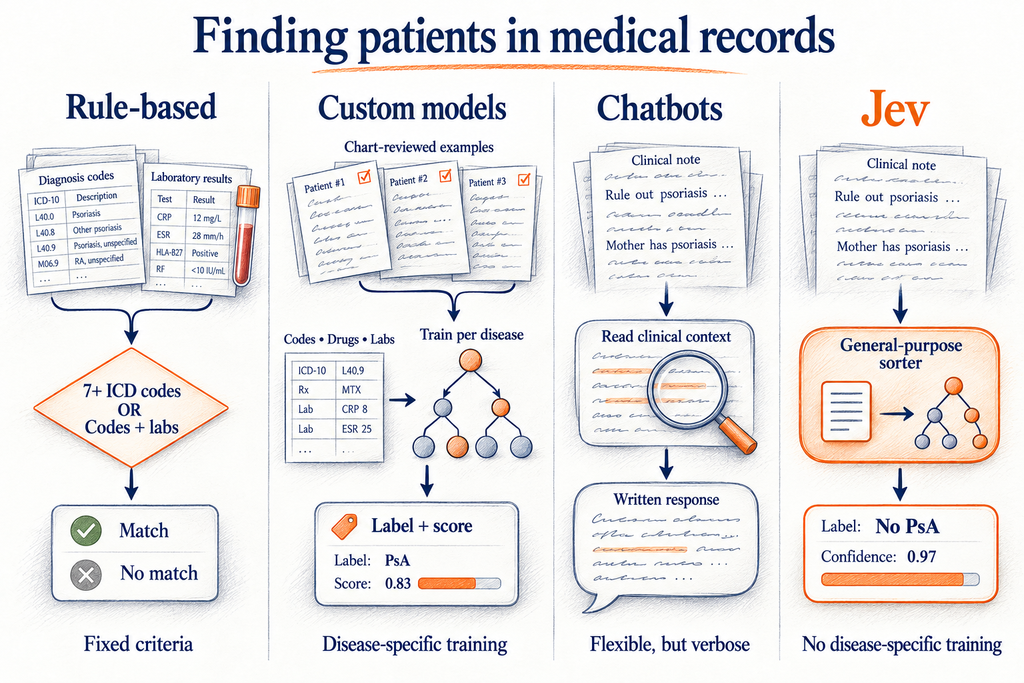
Older medical AI tools could also sort text into categories. But each had to be built for one task, trained on hundreds of hand-labeled charts. A lupus tool couldn’t find psoriasis. Jev takes a new question in plain English, anytime, with no training.
3. It’s “semi-deterministic”
“Deterministic” means the same input always gives the same output, like an ICD-code rule. “Probabilistic” means judgment is involved, like a chatbot.
Jev sits in between. Every Jev workflow has 3 parts:
- The menu (you decide): the question and the allowed answers.
- The judgment (Jev): which answer fits this text, with a confidence score.
- What happens next (fixed rules): what you do with each answer.
Researchers already think this way. A case definition is a fixed rule (“any qualifying note makes the patient a case”). Reading each note is the judgment call. Jev handles only the judgment call.
And because Jev gives a confidence score, you can treat it like a diagnostic test. Raise the cut-off for a clean cohort (higher PPV). Lower it when you can’t afford to miss cases (higher sensitivity). Whether those scores are accurate on medical notes is still an open question, so check.
I hope you are sold on its potential by now (I do not have any affiliations with Jev). So how can researchers use Jev?
0. How to set up Jev
Open a Typesafe account. It’s free.
Then go to typesafe.ai. Click at the top right.

A heads-up first: Typesafe isn’t taking new sign-ups right now. You can join the waitlist today, but you’ll need to wait for access before you can get your Jev key (step 4).
Step 1. Get Claude Code. Claude Code is Claude with permission to create files and run small programs on your computer, in a folder you choose. Download the Claude desktop app (claude.ai/download), sign in with a paid plan, and open the Code tab. (If you prefer ChatGPT, OpenAI’s version is called Codex.)
Step 2. Make a folder. Create a folder on your desktop called “Jev projects.” Select it as the folder Claude works in.
Step 3. Add the Typesafe skill. A “skill” is an add-on that teaches Claude how to use Jev. The easiest way: copy the setup prompt for AI agents from typesafe.ai and paste it into Claude Code. Or type these two lines into Claude Code, one at a time:
/plugin marketplace add typesafe-ai/skills
/plugin install typesafe@typesafe-ai
Step 4. Get your API key (once you’re off the waitlist). In your Typesafe account, click to create an API key. It’s a password that lets Claude talk to Jev for you. Claude will ask for it once. Never paste it into a document or email.
Step 5. Use your free credit. New accounts start with $5, no credit card needed. Typesafe says that’s about 120 million tokens, or roughly 100,000 page-long documents.
To check it worked, type /typesafe in Claude Code. The skill should show up.
1. Jev to find patient phenotypes in the medical record
Every EHR study starts with the right cohort. Get the patients wrong and nothing downstream matters.
Important: you can’t use Jev on real medical records today. Jev runs on Typesafe’s servers, so notes would leave your institution, and privacy policies don’t allow that. It’s also not an open model you can download and run on your own computer. I’m including this example because the architecture is what matters. I’m confident open models built the same way will follow, and those could run inside a hospital firewall. The prompt below uses made-up notes, so you can learn the workflow now and be ready.
What we did
For ACR Convergence 2026, our team built an AI tool to find patients with psoriasis in Vanderbilt’s de-identified medical records (about 3.5 million people). We used Brim, a Vanderbilt-built platform that makes AI chart review very user-friendly.
We hand-reviewed 700 charts: 500 to build the tool and 200 set aside to test it once. On the test set, the AI beat every older method:
| Approach | AUC | Sensitivity | PPV | F1 |
|---|---|---|---|---|
| ICD-code rules | 0.750 | 78.5% | 61.1% | 0.687 |
| Random forest | 0.824 | 78.4% | 64.5% | 0.708 |
| XGBoost | 0.831 | 75.0% | 67.4% | 0.710 |
| Logistic regression | 0.829 | 54.3% | 78.7% | 0.643 |
| AI reading notes | 0.864 | 86.3% | 78.8% | 0.824 |
What it cost
- Model: To control cost, I used an older, smaller model (GPT-4.1 mini). That meant a lot of prompt engineering to make up for it.
- Money: Close to $5,000 for about 1,000 patient records.
- Time: Batches of 10 to 20 patients, each taking 15 to 20 minutes, because the AI reads every note for every patient.
The usual fix is to run a free, open model on your own hardware. A recent Arthritis & Rheumatology letter from the University of Pittsburgh did this for lupus: an open DeepSeek model on one high-end graphics card, inside a HIPAA-compliant environment. Across 2,080 patients, it was 85.1% accurate versus 82.4% for trained nurse reviewers.
Impressive, but it takes a powerful machine, it’s slow, and 2% of charts failed because the AI’s answer came back in the wrong format. That last problem can’t happen with Jev. It can only answer with one of your options.
Why this is a Jev-shaped problem
Looking back, every question we asked about each note was already multiple choice. Who wrote it? Is psoriasis confirmed, biopsy-proven, ruled out, family history, or only on the problem list? Then a fixed rule turned note-level answers into a yes or no per patient.
Even our mistakes map to answer options. The AI’s two most common errors were treating a problem-list entry as a doctor’s confirmation, and reading “minimal psoriasis” as “no psoriasis.” With Jev, each becomes its own option with a clear definition, instead of another paragraph in an ever-longer prompt.
What would Jev have saved? Headline numbers can mislead here. GPT-4.1 mini charged 40 cents per million tokens in and $1.60 out. Jev charges 4.2 cents in and nothing out. That’s roughly 10x cheaper, so my $5,000 might have been a few hundred dollars. The 100x+ savings are versus top-tier models, and I was already on a budget one.
The bigger win is speed. If the reported ~100x speedup holds on medical notes, a 15-minute batch becomes about 10 seconds. That changes how many times you can afford to test and improve.
The prompt (practice with made-up notes)
Use the TypeSafe skill (/typesafe:typesafe-ai) for every Jev question. You write and run the code (Python, typesafe-sdk, model "jev-latest"). I don't read code, so explain everything in plain English. If my TypeSafe API key isn't set up, stop and walk me through it. Never print the key.

GOAL
Build and test a psoriasis-finding pipeline with Jev using made-up notes only. Never use real patient data.

1. MAKE PRACTICE DATA
Create 500 synthetic clinic notes for 100 fake patients (about 40% true psoriasis cases). Include hard cases on purpose: "minimal psoriasis," "rule out psoriasis," "mother has psoriasis," problem-list-only mentions, copied-forward history, and biopsy reports. Save notes.csv (patient_id, note_id, note_date, author_specialty, note_text) and labels.csv (patient_id, case = 0 or 1, split = train for 70 patients, test for 30).

2. DO IN CODE, NOT JEV
All counting, dates, patient-level rules, cut-offs, and metrics. Send Jev only the text around each psoriasis keyword (psoriasis, psoriatic, PsO, plaque, guttate) plus 3 sentences on each side. author_specialty comes from the data; never ask Jev to guess it.

3. JEV QUESTIONS (one request per passage, all questions together; state = {passage, author_specialty})
Write the full question in each question's instructions.
- psoriasis_status: Choice
  - affirmed_by_provider: the author says the patient has psoriasis now or is treating it, including mild or "minimal" disease.
  - biopsy_confirmed: a skin pathology result consistent with psoriasis.
  - problem_list_only: psoriasis appears only in a problem list, history list, or copied template text, with no current statement by the author.
  - family_history_only: psoriasis refers to a relative.
  - ruled_out: the author rules psoriasis out or says the patient does not have it.
  - differential_only: psoriasis is one possibility among others.
  - unclear: the passage does not allow a judgment.
- on_psoriasis_treatment: Noul "The passage says the patient is using a psoriasis treatment (topical, light therapy, systemic, or biologic)."

4. PATIENT RULE (in code)
Patient score = the highest probability of affirmed_by_provider (dermatology or rheumatology notes only) or biopsy_confirmed across that patient's passages. Case if score >= 0.6.

5. CHECK BEFORE RUNNING
Show me the plan and every Jev question first, and wait for my approval. Then run 20 training passages and show each passage, the answers, and the probabilities. Wait for my OK.

6. VALIDATE
Adjust the 0.6 cut-off on training patients only, showing sensitivity and PPV before and after. Then run the test patients once. Report sensitivity, specificity, PPV, NPV, F1, and AUC (from the patient score). List every misclassified patient with the answers that drove the call. Record the exact Jev model version, total tokens, cost at $0.042 per million input tokens, and run time. Save everything in summary.md.
2. Jev to sort your Gmail
Most faculty and researchers (including me) have thousands of unread emails. Buried in there: a review invitation with a deadline, a mentee asking for a letter, a program officer’s reply. All surrounded by predatory journals that “admire your esteemed work.”
What you need: Your email from Google. Go to takeout.google.com, click “Deselect all,” check only Mail, and export. Google emails you a download link (it can take a few hours). Unzip it and put the file ending in .mbox in your “Jev projects” folder.
Use your personal Gmail, or check your institution’s policy first. Many university accounts don’t allow email to go to outside services.
The prompt:
Use the TypeSafe skill (/typesafe:typesafe-ai) for every Jev question. You write and run the code (Python, typesafe-sdk, model "jev-latest"). I don't read code, so explain everything in plain English. If my TypeSafe API key isn't set up, stop and walk me through it.

GOAL
Sort my last 12 months of email into a spreadsheet so I can see what needs me. Never send, delete, move, or label any email.

INPUT
The Google Takeout .mbox file in this folder. Read it on this computer with Python's mailbox library. Keep emails from the last 12 months, one per thread (the most recent).

PRIVACY
Send Jev only: sender name, sender domain, subject, and the first 600 characters of the body with signatures and quoted replies removed. Skip any email that mentions "patient," "MRN," or a date of birth, and list those in a "Not sent" tab.

DO IN CODE, NOT JEV
Dates, counts, whether I replied, and how often each sender writes to me.

JEV QUESTIONS (one request per email, all questions together)
- email_type: Choice
  - review_invitation: a journal editor asks me to review a manuscript.
  - my_paper_decision: a decision or revision request on my own submission.
  - grant_or_funding: funding notices, deadlines, or messages from program officers or grant offices.
  - colleague: someone I work with, about shared research.
  - mentee: a trainee asking for help, a meeting, feedback, or a letter.
  - real_invitation: an invitation to speak, serve, or attend from a recognized society, university, or journal.
  - predatory_or_spam: unsolicited invitations to publish, join an editorial board, or speak, from unfamiliar journals or organizers, often flattering or asking for fees.
  - admin: HR, compliance, IT, or department announcements.
  - newsletter: bulk mail.
  - unclear: none of the above can be judged.
- needs_my_action: Noul "The email asks me to do something, decide something, or reply."
- urgency: Score ["No deadline", "Deadline more than a month after the email was sent", "Deadline within a month of the email", "Deadline within a week of the email"]

RULES (in code)
"Act now" = received in the last 14 days, needs_my_action >= 0.7, and urgency within a month or sooner.

CHECK BEFORE RUNNING
Show me the questions first and wait for my approval. Then run 50 random emails and show sender, subject, answers, and probabilities. Wait for my OK before running the rest, 8 at a time, retrying if rate-limited.

OUTPUT
Inbox_triage.xlsx with tabs: Act now, Review invitations, Mentees, Grants, Probably predatory, Everything else, Not sent. Newest first. A summary tab with counts, total cost at $0.042 per million input tokens, and run time.
Share this with the colleague who has 4,000 unread emails.
3. Jev to keep up with the literature
PubMed now adds about 30,000 papers every week. Systematic reviewers screen thousands of abstracts by hand, often twice.
Screening is classic System 1 work. Right study design? Right population? Right outcome?
One scientist reportedly asked Jev to pick the 100 most important immunology questions from 10,000 candidates drawn from the literature, and judged the picks about right. Jev can’t answer those questions. That takes a chatbot, and a human. But it can point your attention at the right 1%.
The prompt (swap in your topic):
Use the TypeSafe skill (/typesafe:typesafe-ai) for every Jev question. You write and run the code (Python, typesafe-sdk, model "jev-latest"). I don't read code, so explain everything in plain English. If my TypeSafe API key isn't set up, stop and walk me through it.

QUESTION
Which papers from the last 12 months are relevant to [your topic, e.g., "cardiovascular outcomes of biologic therapy in psoriatic arthritis"]?

PLAN
1. Pull records from PubMed with NCBI E-utilities (esearch with usehistory=y, then efetch in batches of 200). Query: [your PubMed search, or ask me to help write one]. Stay under 3 requests per second. Save every batch so reruns are free. Keep PMID, title, abstract, journal, year, publication types, and DOI. List records with no abstract separately; don't send them to Jev.
2. Jev questions, one request per record, all questions together, state = {title, abstract, publication_types}:
   - study_design: Choice [randomized_trial, cohort, case_control, cross_sectional, case_series_or_report, systematic_review_or_meta_analysis, basic_or_translational, narrative_review_or_commentary, other, unclear], with one clear definition per option.
   - population_match: Noul "The study population is [your population]."
   - exposure_match: Noul "The study examines [your exposure or treatment]."
   - outcome_match: Noul "The study reports [your outcome]."
   - relevance: Score ["Not relevant", "Background only", "Relevant", "Directly answers my question"]
3. Show me every question first and wait for my approval. Then run 40 random records and show PMID, title, answers, and probabilities. Wait for my OK.
4. In code: Include = population, exposure, and outcome each >= 0.6 and relevance at "Relevant" or higher. Anything between 0.4 and 0.6 goes to "Human review."
5. Output a spreadsheet with tabs: Include, Human review, Exclude (with reason), Counts by study design. Add methods.md with the Jev questions word for word, the model version, counts at each step, and total cost.

RULES
Jev screens. I decide. Never drop a record without a logged reason.
For a formal systematic review, use Jev as a second screener next to a human, never the only one, and report it in your PRISMA diagram.
4. How you can use Jev for your work
The test: messy text goes in, a short list of choices comes out.
- Does this note describe a side effect? How severe?
- Why was the biologic stopped? (not working, side effect, cost, patient choice, unclear)
- Smoking status or disease activity buried in notes.
- Thousands of free-text survey answers sorted into your themes.
- Reviewer comments sorted into major, minor, and already addressed.
Not sure where to start? Open Claude Code in a project folder and paste:
Use the TypeSafe skill to find a step in this project where we ask a chatbot to choose from a fixed set of answers. Build a Jev version of that step. Run both on the same 50 examples and show me agreement, speed, and cost side by side, in plain English.
Where Jev falls short
- Privacy. Your text goes to Typesafe’s servers. No patient data, for now. Typesafe says it won’t train on your inputs, but its privacy policy says nothing about HIPAA or business associate agreements.
- It judges meaning. It doesn’t count. Dates, totals, and criteria scoring belong in simple code. That’s why every prompt above says “do in code, not Jev.”
- Your answer options are your study design. Vague options give vague answers. Always include “unclear.”
- Launch numbers are launch numbers. AI has a “jagged frontier“: excellent at some tasks, weak at others that look similar. In the Harvard and BCG study that coined the term, consultants using AI on a task just outside that frontier were 19 percentage points less likely to get it right. Test on your own data.
- It’s brand new. I haven’t seen a published validation on medical notes yet. That’s an opening for us. The closest is an early preprint on scientific decisions, where Jev answered all 100 planned questions correctly and was the fastest of 12 setups tested.
What I expect next
Jev isn’t open today (but I expect it to open new sign-ups soon). You can’t download it and run it inside your hospital. For clinical research, that’s the main barrier.
But the architecture is what matters. Now that this approach works, I’m confident open models built the same way will follow. One that runs behind a hospital firewall would solve privacy, cost, and speed at once.
The name has a story too. It’s a nod to William Stanley Jevons, a 19th-century economist who noticed that more efficient steam engines led to more coal use, not less. In his words: “It is wholly a confusion of ideas to suppose that the economical use of fuel is equivalent to a diminished consumption.” When something gets cheaper, we find new uses for it.
For research, that could mean re-running your cohort across the entire EHR every time you refine the case definition. Testing five case definitions instead of one. Reviewing every note instead of a sample.
We used to skip these because they cost too much. Soon, we may not have to.
What’s the Jev-shaped problem in your research?
Top Papers on AI in research this week:
- Same Average Score, Different Risk – A Journal of Medical Systems study tested six frontier LLMs on 54 hard emergency medicine cases. The top two models gave dangerous advice in 1.5% of case-rounds. Four others hit 6.0%. Most failures (91%) were random, so a model can answer safely once and dangerously the next time. Standard benchmarks miss this.
- Tailoring LLMs for Clinical Decisions – A JMIR systematic review of 35 studies compared fine-tuning, retrieval-augmented generation, and hybrids. Narrow image tasks did best with retraining. Complex reasoning did best with database access. Hybrids won for workflows such as stroke assessment and cancer treatment planning. Most studies still used historical records, not live patients.
- Do LLMs Change Peer Review? – An ICML 2026 randomized experiment assigned reviewers to either ban or allow limited LLM use. Decisions, scores, and reviewer confidence barely moved. Permissive-policy reviews ran 5.5 to 7% longer. Compliance was shaky: 22.5% of reviewers under the ban used LLMs anyway.
- Dartmouth Provost and the AI Detector – Student journalists ran Provost Santiago Schnell’s writing through the Pangram detector. Five pre-2022 articles read as fully human. Nine 2026 pieces scored a median 96% AI-written. He says he used AI for copyediting and clarity. The case is now a live test of disclosure norms in academic writing.
Top Papers on AI in education this week:
- StudentBench: AI vs Human Tutoring – A new arXiv study of 2,383 participants and 175,000+ student-AI messages found AI tutoring matched expert human tutors on GRE learning gains. AI won five of seven GRE domains. The reported cost was $0.0052 versus $4.81 per percentage point gained. It is a preprint, so treat the cost claim with care.
- Learning With AI or Just Getting Answers? – Education Review argues that student AI use is mostly ad hoc and unguided. The fix is teaching students how to learn with AI. Task completion is the wrong target. Only the intro was visible behind the paywall.
- Students at Stake – A Student Defense report says colleges are adopting AI faster than they are protecting students. It flags risks in admissions, aid decisions, advising, and teaching. Bias, data privacy, and thin disclosure top the list. Its advice: set governance and safeguards before deployment.