

Claude did it first.
In January 2026, Anthropic shipped Cowork, an AI agent built for the “work around work” instead of just coding. It ran tasks in the background, followed you across devices, and pinged you only when a decision was yours to make. By July it was on your phone and browser too.
OpenAI watched, took the idea, and did something clever with it. Instead of building a separate app, they folded the same capability straight into the ChatGPT you already open every day. Now there is a toggle at the top of the desktop app: Chat, Work, and Codex.
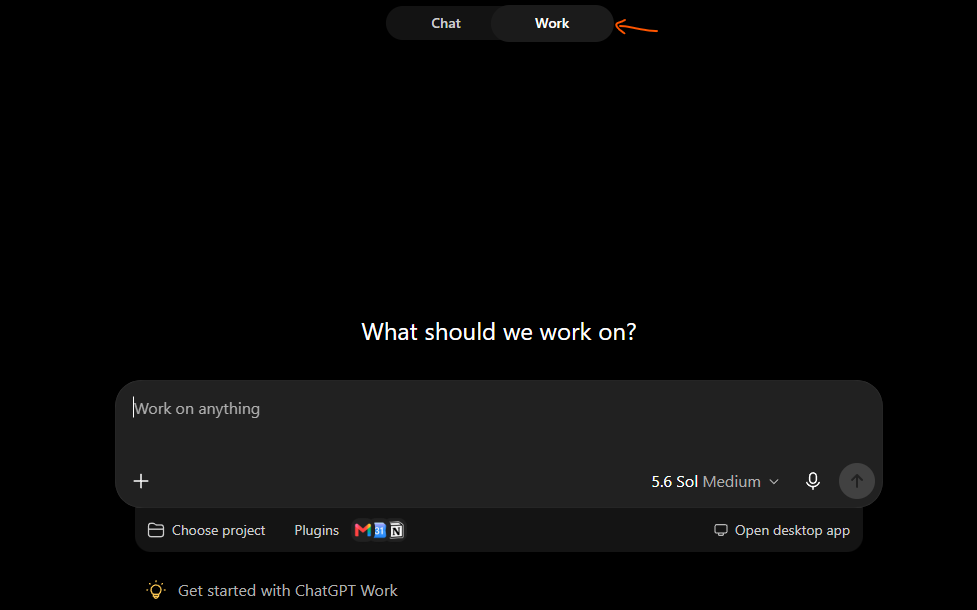
Most researchers I talk to have never flipped past Chat.
That is a mistake, and this post fixes it.
I am going to show you what Work actually does, when to use Chat versus Work, which GPT-5.6 model to pick, and then the setup I would build if I were a busy clinical researcher trying to stop drowning in deadlines, co-author emails, and meeting prep.
⏰ Quick reminder – I’m running 2 FREE live webinars this month with limited seats:
- For grant writing with AI masterclass (Sat July 25, 10 AM CDT), register here: https://risingresearcheracademy.easywebinar.live/event-registration-13
- For manuscript writing with AI masterclass (Sun July 26, 10 AM CDT), register here: https://risingresearcheracademy.easywebinar.live/event-registration-14
1. Chat vs. Work vs. Codex (paradox of choice), and why Work is the one you want
OpenAI’s own naming makes this more confusing than it needs to be.
- Chat is the regular ChatGPT you already know. You ask, it answers. Fast, conversational, single-turn.
- Work is ChatGPT that can actually do things: run a multi-step task, act inside your apps, produce a document or spreadsheet or Site, and repeat on a schedule.
- Codex is Work with extra features for writing and reviewing code. If you are not living in a code repository, you can ignore it.
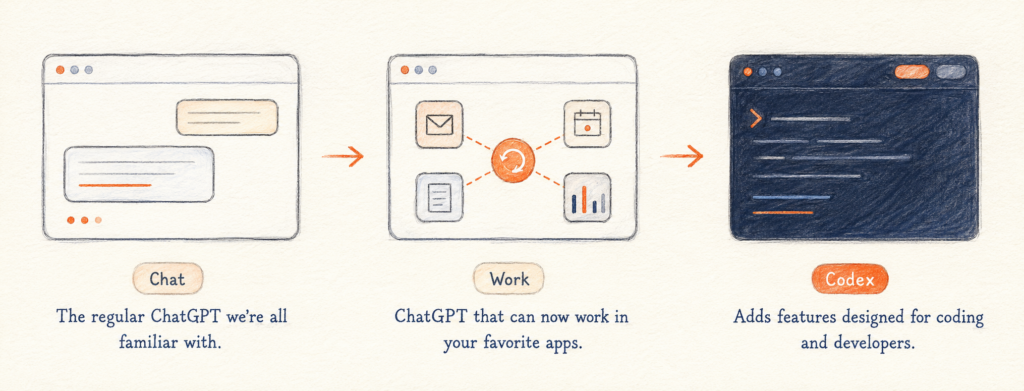
For 90% of research work, the choice is Chat or Work. The difference is not intelligence. Both run the same GPT-5.6 models. The difference is agency.
Chat responds to you one message at a time. Work takes a goal, breaks it into steps, uses your connected apps and files, and comes back with a finished result.
As a simple example:
Paste a one-hour interview transcript into Chat and ask for the full transcript, and it often chokes or you have to ask it to provide it in fragments because it is built for turn-by-turn conversation. Now if you hand the same transcript to Work, and it treats the job as a task: it can churn through the whole thing in one run, save intermediate notes to a file, and return an accurate, structured transcript.
Chat is a smart colleague at a whiteboard. Work is an assistant you can hand an assignment to and walk away.
A framework for deciding. I find it helpful to think about what Ethan Mollick calls “equation of agentic work”. Delegating a task to AI pays off when 3 things line up:
- The task would take you a long time to do yourself,
- The AI has a decent shot at doing it acceptably, and
- The cost of asking, waiting, and checking the result is low.
ChatGPT Work shines exactly there: long, repetitive, multi-step jobs that you can verify quickly. Chat is better for the opposite: short, high-judgment moments where you want to think alongside the model and check every line as it comes.
Another way to think about this is Cyborg vs. Centaur mode. When you work back and forth with AI, sentence by sentence, intertwining your effort with its, you are a Cyborg. When you cleanly hand off a whole task and then review the output, you are a Centaur. Chat is your Cyborg tool. Work is your Centaur tool. You need both.
| Reach for Chat when… | Reach for Work when… |
|---|---|
| You want a quick answer, definition, or gut check | You want a finished deliverable: a drafted Methods section, a formatted table, a screened abstract list |
| You are brainstorming a title or thinking through a study idea | You are handing off a whole job: “summarize these 12 papers into an evidence table” |
| The input is short and the exchange is a single turn | The input is large: a full protocol, a grant draft, a long transcript, a folder of PDFs |
| No app access is needed | The task needs to act in Gmail, Google Calendar, Drive, Docs, Sheets, or your PDFs |
| It is a one-off question | It should repeat: a weekly literature brief, a deadline monitor, a recurring status check |
| You will verify the reasoning line by line yourself | You are assembling, formatting, and cross-referencing across many sources and files |
My recommendation is boring and correct: install the ChatGPT desktop app, keep Chat for thinking, and move your actual work into Work. The desktop app is the single biggest upgrade over the browser version, because that is where Work can touch your files and apps.
2. Which GPT-5.6 model and effort to use
GPT-5.6 comes in three variants, and each runs at effort levels from Low up to Ultra. This is 70-plus possible combinations, which is absurd, so let me simplify it for you.
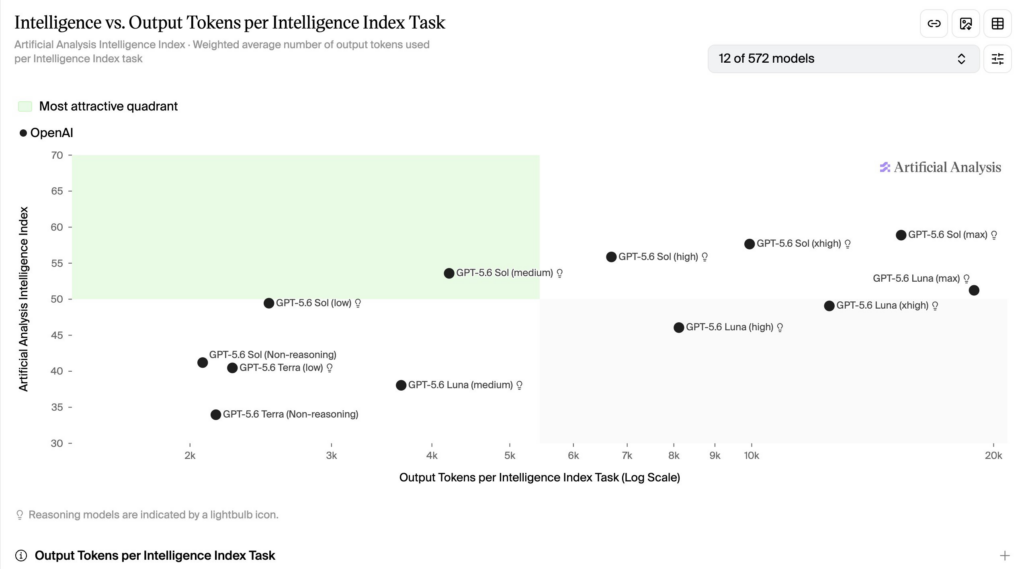
- Sol is the flagship. Highest intelligence, highest cost. This is your default for anything that touches the science: drafting, reasoning through a design flaw, interpreting results.
- Terra is the balanced middle. Close to last-generation flagship quality at roughly half the cost. A fine default for routine work if you are watching your token budget.
- Luna is the fast, cheap one. Good for bulk, low-stakes tasks like reformatting references or tidying a list.
For effort, medium is the sweet spot. It gives you strong output without burning through tokens. Bump to high or max only when you are asking for something genuinely hard: planning a full analysis, restructuring an entire manuscript, or working through a thorny stats question.
My rule: Sol at medium effort for writing and reasoning and reach for high or max effort only when the problem is hard enough to earn it. I almost never use Terra or Luna.
Do not overthink this. The model picker is a place people waste hours; medium effort on a capable model covers almost everything.
3. Personalize your custom instructions, researcher-first
The first thing to do on a fresh install is teach the model how you want it to behave. Go to Settings, then Personalization, then Custom Instructions. This applies across every thread, so you set it once.
Generic AI writes like a press release and agrees with everything you say. Neither is useful when your credibility is on the line. Here is a starting set, tuned for a clinical researcher.
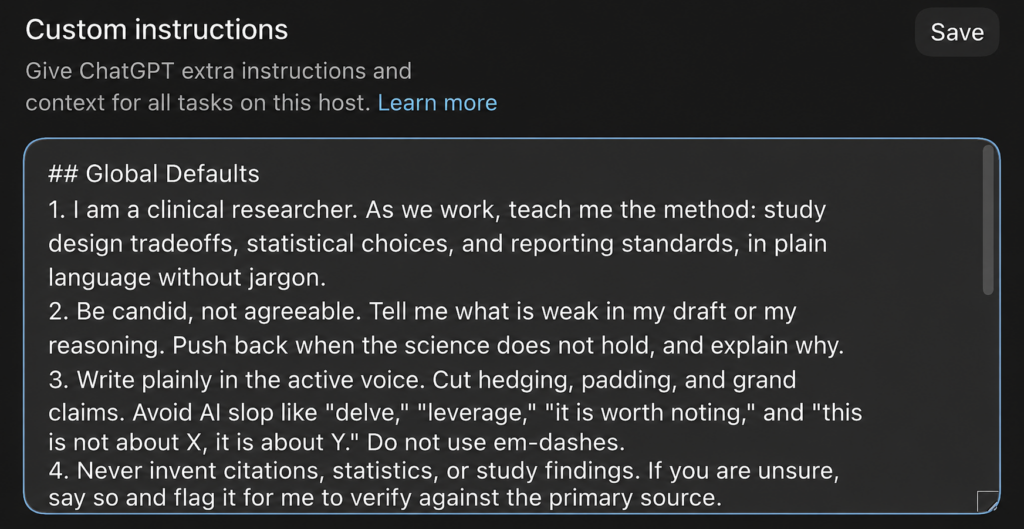
Copy and adjust as necessary:
- I am a clinical researcher. As we work, teach me the method: study design tradeoffs, statistical choices, and reporting standards, in plain language without jargon.
- Be candid, not agreeable. Tell me what is weak in my draft or my reasoning. Push back when the science does not hold, and explain why.
- Write plainly in the active voice. Cut hedging, padding, and grand claims. Avoid AI slop like “delve,” “leverage,” “it is worth noting,” and “this is not about X, it is about Y.” Do not use em-dashes.
- Never invent citations, statistics, or study findings. If you are unsure, say so and flag it for me to verify against the primary source.
The most dangerous failure mode of AI in research is not a clumsy sentence, it is a confident, fabricated citation that slips into your reference list. This is measured, not hypothetical: in a Scientific Reports analysis, 18% of the bibliographic citations GPT-4 generated were fabricated outright, and about a quarter of the real ones still contained errors. Instructing the model to flag its uncertainty does not remove your obligation to check, but it makes the checking easier. (In our extended testing for Research Boost, the latest models, even 5.6 Sol Ultra hallucinates citations around 6%. A lot better compared to previous models but not 0)
If you want a structured way to write the prompts themselves, use the Persona(l) GOAL framework: set the Persona the model should adopt, the Goal you want, the specific Output format, and the Lens of context and constraints it needs. A vague prompt gets a vague draft. Precision in, precision out.
4. Install plugins so ChatGPT can reach your work
Plugins are what turn Work from a clever chatbot into something that actually runs your day. They connect it to the apps you already live in. This is the setup step people skip, and it is the one that matters most.
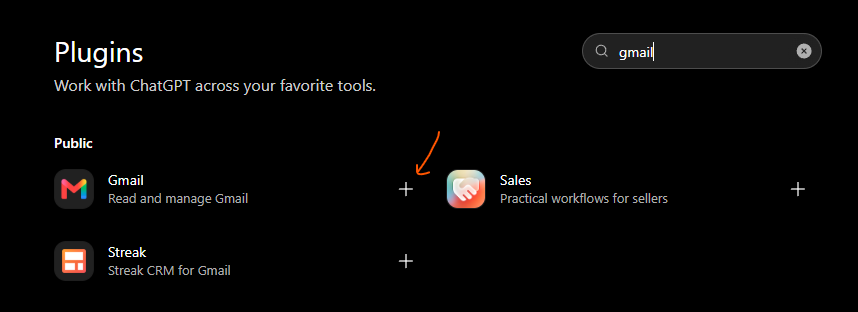
Click on Plugins:

Search what you want in the search bar and click on the plus sign next to what you want installed:
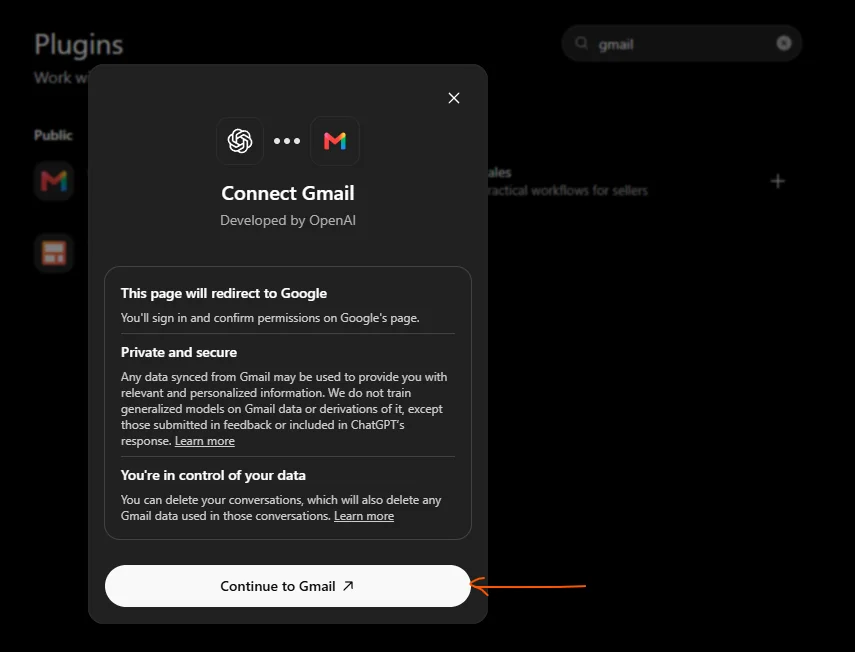
You will have to provide access:
The bare minimum for a researcher:
- Gmail and Google Calendar, so it can triage email and manage your schedule.
- Google Docs, Sheets, Slides, and Drive, so it can draft manuscripts, build tables, make figures, and file everything.
- PDF, so it can read and annotate the papers and protocols you work with all day.
Then add the ones that fit your world: your reference manager, Slack for lab and collaborator messages, Notion for your lab wiki or SOPs, and a meeting-notes tool if you use one. There is no real downside to connecting the apps you already use. The more it can reach, the more it can actually do for you.
5. Build a personal assistant thread for email and deadlines
This is where the time savings start, so I want to slow down here.
Inside Work, organize by long-running threads, one per type of work, not one per task. The model is good at compacting a long conversation while remembering what came before, so a single thread can run for weeks without getting confused. This is far easier to manage than a graveyard of one-off chats. Pin the ones you use daily.
The first thread every researcher should build is a personal assistant thread. Start a new task and tell it plainly: “This is my personal assistant thread. You help me manage email, deadlines, and my calendar.” Then put it to work.
Find the deadlines and follow-ups you are forgetting. The failure mode for most of us is not missing an email, it is reading it, meaning to reply, and forgetting.
FIND EMAILS TO FOLLOW UP ON AND UNSUBSCRIBE. Copy and paste below prompt:
Check my email from the past 30 days and list the top five items in each category:
• Open action items I should follow up on
• Emails and subscriptions I should unsubscribe fromInclude a direct link to every email. Do not send, delete, or unsubscribe from anything without asking me first.
You can tell it to prioritize grant submissions, IRB renewals, revise-and-resubmit due dates, co-author sign-offs, and reviewer replies. Work reads across a month of email in seconds and surfaces what is about to bite you.
Draft replies in your own voice. A raw AI draft reads like a form letter, which is worse than useless when you are writing to a program officer or a senior collaborator. So teach it your voice once.
BUILD A SKILL TO DRAFT EMAILS IN YOUR VOICE. Copy and paste below prompt:
Review my recent sent emails and create a skill called /email that drafts replies in my voice and style.
Work will read how you actually write, including the fact that you are more formal with people you do not know and looser with your lab, and save it as a reusable skill. Then test it on a real reply before you trust it. It will not be perfect on the first pass. Iterate with it, the same way you would coach a new research coordinator, until the drafts sound like you.
Then, the guardrail. Work can send email on your behalf once Gmail is connected. Do not let it. Have it draft, and you review and send. For anything involving a co-author, a reviewer, an editor, or an IRB, you read every word before it goes out. Delegation is not abdication.
6. Manage your calendar and prep for meetings
Booking meetings by hand is exactly the kind of low-value, multi-click chore Work was built to absorb.
Scheduling. Instead of clicking through Google Calendar, just ask: “Book a 30-minute co-author call with Dr. Lee on Thursday at 12 pm Central, add a Meet link, and flag if it conflicts with anything.” Work finds the contact, checks your calendar, catches the conflict with your existing lab meeting, and books it. Give it a screenshot of a scheduling email or a message thread where you agreed on a time, and it will turn that into a calendar event for you.
The same trick handles the deadlines that live in your head instead of your calendar. Ask it to add every abstract deadline for your target conferences, or every milestone date from a funded grant’s timeline, as calendar events. What takes you 15 minutes of copying and pasting takes it one.
Meeting prep. This is the part that saves your evenings. Say you have a lab meeting, a journal club, and a study section review coming up. Build a prep skill and run it per meeting. For journal club, it can pull the paper, summarize the design and its weaknesses, and draft the questions worth raising. For a manuscript meeting, it can assemble the open decisions and turn them into an agenda. Then have it write the whole thing straight into a Google Doc you can share with the group.
I would do this the same way I taught it my email voice: run it once, apply your judgment, refine the skill, and let it get sharper each time. The goal is a repeatable system, not a one-off prompt.
7. Automate the recurring work with scheduled tasks
Everything in sections 5 and 6 was manual: you asked, it answered. Once a workflow is working, you stop asking and let it run on its own. Work can run a task once, repeat it on a schedule, or trigger it when something changes. The people who are genuinely good at this have a stack of scheduled tasks quietly working in the background.
Build yourself a Friday research brief. In your personal assistant thread, set up a scheduled task that merges the email and calendar workflows into one:
BUILD A WEEKLY EMAIL AND CALENDAR HEARTBEAT. Copy and paste below prompt:
Schedule a task to run every Friday at 7 a.m. CDT that:
Checks my email from the past 30 days
• Lists my top five open action items and unsubscribe candidates
• Drafts follow-up replies in my voice for reviewChecks my calendar for important meetings in the next seven days
• Prep me for them by searching emails and other sourcesInclude direct links to every email, event, and document. Do not send emails or modify my calendar without asking me first.
Tune it for research: have it flag grant deadlines, IRB renewals, and revision due dates by name, and run your meeting-prep skill for any journal club, lab meeting, or committee review so a prep doc is waiting in Drive.
Now every Friday, before you have had coffee, you get a single brief that replaces opening five apps to figure out what next week actually demands. That is the difference between reacting to your inbox and running your week.
Scale the idea to your rhythm:
- A weekly literature scan that checks your saved searches or alerts, pulls the new papers in your area, and drafts a two-line “why this matters” note on each. You still read and judge, but the triage is done.
- A monthly check on your citation count or the status of manuscripts under review, so nothing sits silently in an editor’s queue for six weeks.
- A deadline monitor that watches for the funding announcements and submission windows you care about.
The pattern is always the same: do the work manually with Work once, get it right, then ask it to schedule that work so it happens without you. That is how you go from using AI to having AI work for you.
8. Continue from your phone
Half of this becomes real when it follows you out of the office. In the ChatGPT app on your phone, the Remote tab connects to your Work threads through your computer.
There is a catch worth knowing: the remote threads run through your desktop, so your computer has to be awake. A small keep-awake utility like Amphetamine solves it. Before you leave, set your laptop to stay awake for a few hours, and you can keep the work moving from your phone while you are between clinic and the parking lot.
One caution: watching your agents churn on your phone is not much better than doomscrolling. The point of automating your research operations is to buy back time for deep work and for your life, not to spend that time babysitting tasks. Set it up, then put the phone down and go do the science only you can do.
9. Publish Sites when a PDF is not enough
Work can publish simple websites, called Sites, that you share privately or publicly without touching a line of code. For researchers, this is more useful than it sounds.
A static PDF protocol is something people skim once and lose. An interactive one-pager they can click through is something they actually use. A few ideas worth trying:
- A website for your research lab, with your team, publications, ongoing projects, and contact details, live in minutes instead of waiting on your institution’s web team.
- A study one-pager for recruiting collaborators or briefing a new team member, with the aims, design, and timeline laid out visually.
- An interactive protocol or SOP that a coordinator can navigate by section instead of scrolling a 30-page document.
- A figure or results gallery to share with co-authors for feedback before you lock the manuscript.
Interestingly, a lot of teams inside the AI labs have started reviewing plans as interactive web pages instead of documents, precisely because they are easier to read and comment on. Tell Work what you want, describe it plainly, and it builds it. You do not need to be a developer.
Your setup checklist
If you do nothing else, do these:
- Install the ChatGPT desktop app and start using the Work toggle (or you can just toggle it on your online browser up top). It is a bigger upgrade than any single model release.
- Default to GPT 5.6 Sol at medium effort. Higher effort for genuinely hard planning.
- Set researcher-first custom instructions. Candid, plain, no invented citations, nothing confidential stored.
- Connect your plugins: Gmail, Calendar, Docs, Sheets, Slides, Drive, PDF, and your reference manager. This is the step that unlocks everything.
- Build a personal assistant thread for email, deadlines, and calendar. One long-running thread, not scattered chats.
- Schedule a Friday research brief so the work happens without you asking.
- Guard the human-in-the-loop. Review before anything sends, verify every citation, and keep patient data out.
None of this replaces your judgment, your expertise, or your authorship. It removes the administrative drag that sits between you and the work that actually advances your career. Old, proven research habits plus a capable agent handling the busywork is a real edge, and right now most of your peers have not flipped the toggle.
You now know where it is. Flip it, build one scheduled task this week, and tell me what you automated first.
Top Papers on AI in research this week:
- The Creeping Normalization of AI in Life Sciences – Quiet, step-by-step AI adoption is reshaping biology, a new Frontiers in Ecology and the Environment paper warns. Ivan Jarić and an international team say LLMs increasingly stand in for human collaboration. The risk is thinner originality and intellectual echo chambers. Their advice is blunt. Let AI proofread routine text, but keep peer review, funding calls, and ethics decisions with people.
- Teaching LLMs to Reason Through Chemistry – Most models can guess a reaction’s product, yet they stumble on the mechanism behind it. Researchers built a large mechanism-focused dataset and a tough new benchmark called FukuyamaBench. Their fine-tuned Qwen3-30B model outperformed specialized alternatives on step-by-step reaction reasoning. The work points toward AI that chemists can actually trust for drug and materials research.
- Small Models That Beat GPT-5 on Medication Leaflets – Turning dense biomedical data into text patients understand is harder than it sounds. A team led by Xi Yang tested ways to post-train compact language models for the task. One method, GRPO, produced the most reliable results across datasets. It even edged out much larger proprietary models like GPT-5. Smaller and cheaper, it turns out, can still win on clinical writing.
Top Papers on AI in education this week:
- AI Tutors Still Trail Human Teachers – Schools like Alpha are betting big on AI instruction, but the evidence has not caught up. Penn State’s Gerald LeTendre reviewed the research and found no clear win for AI tutors over human ones. A 2020 NBER analysis showed human tutoring drives consistent gains across subjects and ages. His takeaway is practical. Use AI to support teachers, not to replace the relationships that make learning stick.
- Grading Essays When the Rubric Keeps Changing – Automated essay scorers often break the moment you swap the grading criteria. This paper tackles cross-rubric generalization for critical-thinking essays. The authors test whether a model trained on one rubric can score fairly under a different one. Presented at a SIGKDD 2026 education workshop, the work targets a real classroom headache. Rubrics rarely stay fixed.
- Writing Harder Questions, in Many Languages – Good assessment needs questions that push past recall, and that is tough to automate. Suna-Şeyma Uçar and colleagues built a system to generate high-order questions across multiple languages. The aim is deeper thinking for multilingual classrooms, not just fact retrieval. It is a step toward assessment tools that work well beyond English-only settings.